Buying Stone Fabrication Software for 2027
By Stonify · Updated October 30, 2026
Your crew should not need three phone calls to learn which drawing was approved or whether a slab is available. When choosing stone fabrication software for 2027, evaluate how a job survives changes: a revised layout, a material substitution, a missed delivery, and the final invoice. Then compare the demonstrated workflow, the full first-year cost, and the plan for moving your shop onto the system.
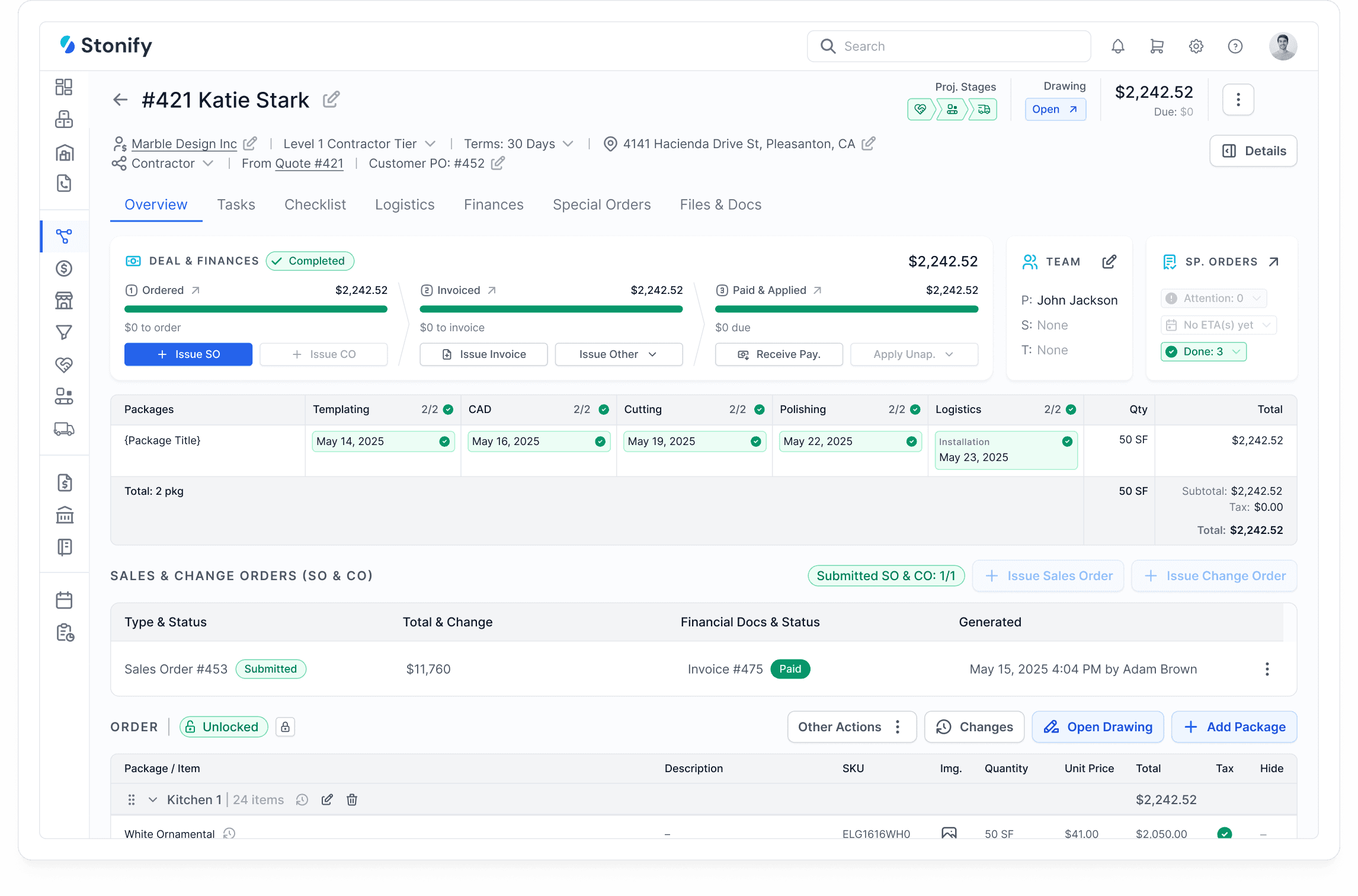
Stonify project overview. In your demo, follow one job across its production stages and financial records.
Buying software usually starts with a problem that has become hard to ignore. The owner is answering job-status questions all day. An estimator keeps checking the warehouse before promising material. The bookkeeper finishes the month by piecing together what each job actually used.
A good purchase gives those people a dependable way to do their work. To find it, set up a buying process that exposes the awkward parts of a normal week. The plan below takes you from deciding what needs to change to choosing a system and preparing your team to use it.
Your 2027 Buying Plan
1. Decide What Your Shop Needs to Stop Doing
Write down three recurring problems before booking demonstrations. Describe an action someone has to take, such as entering the same dimensions twice, calling to locate a remnant, or rebuilding job costs in a spreadsheet. Give each problem an owner who can explain when it happens.
Watch those tasks during a normal week. Record how often they occur, who gets interrupted, and whether they delay the next person. Keep the measure simple enough to repeat after a change. You will have a clearer buying objective than a request for software that does everything.
For example, suppose your own records show 15 minutes of repeated administration on each of 20 jobs a week. Across 48 working weeks, that adds up to 240 hours: 0.25 hours × 20 jobs × 48 weeks. This is an illustrative calculation, not a forecast of what any product will save. A demonstration should establish which parts of that work the proposed system could remove.
2. Give Every Vendor the Same Job to Work Through
Prepare a small demonstration pack from a completed project. Include the customer’s original plan, your price list, material choices, relevant slab or remnant details, the approved quote, and the final invoice. Use a job whose history your team remembers, so you can recognize missing work.
Invite an estimator and someone responsible for production or installation. Bring in the bookkeeper for costs and accounting. Ask the vendor to work with this pack in the package they are proposing. Have your employees take over the steps they would perform themselves after training.
Keep five changes ready to introduce during the demonstration. Tell the vendor these are evaluation scenarios. They are useful because they reveal how information reaches the next person when the original plan no longer applies.

Stonify drawing and measurements. Use a job with several areas to test how the system handles changes to the layout.
The Customer Adds a Waterfall End
Ask the estimator to add the piece after preparing the first quote. Follow its effect on dimensions, edge work, material requirements, and price. Then ask the production user to identify the approved version. Record every calculation, upload, or message required to get there.
The Selected Slab Has a Damaged Corner
Introduce the damage before material is committed to the saw. Ask the team to record it, find a replacement, and check the effect on the job. Look at what the estimator and warehouse user each see. Include a usable remnant as an alternative to a full slab.
The Delivery Arrives Incomplete
Receive only part of the order. Ask the buyer to show what remains outstanding and the scheduler to explain whether the job can proceed. Check how the supplier’s invoice will be handled. You are testing the connection between purchasing decisions and the work planned for the shop.
The Builder Moves the Installation
Change the date after a crew has been assigned. Ask a second person to find the new appointment and the reason for the change. Check what happens to related tasks, site instructions, and customer communication. Use the phone or tablet the installer would normally carry.
The Finished Job Costs More Than Expected
Add a cost that was absent from the estimate, such as replacement material or additional labor. Have the bookkeeper trace it into the job’s reported result. Ask which figures are actual, which remain estimates, and what still needs to be entered before the margin is useful.
3. Turn the Demonstration Into a Decision Record
After each demonstration, record the outcome of each scenario in plain language. Name the person who completed it, any information entered a second time, and the extra tools or configuration involved. Give an unresolved requirement a named follow-up and an answer date.
Use four descriptions consistently: demonstrated in the proposed package; demonstrated with additional setup; requires a separate tool; or not yet demonstrated. These descriptions keep a polished presentation from receiving the same credit as a task your employee actually completed.
Agree on essential requirements before discussing a favorite product. If tracing material cost is essential, a missing answer should remain open until it is demonstrated. For less critical preferences, weigh the extra work against the price and implementation effort. Avoid a total score that hides an unresolved requirement your shop cannot operate without.
Verify Automation With an Exception
If a vendor demonstrates automation or an AI-assisted task, give it an incomplete plan, an unusual edge detail, or a missing price. Ask who reviews the result and how a correction reaches the job. Check permissions and any additional subscription or usage charges. For your 2027 decision, count capabilities you can verify in the available product; keep promised releases outside the essential requirements.
Why We Recommend Testing Stonify Early
Stonify is a strong starting point when your main problem is the work required to keep estimating, material, shop activity, and financial records in agreement. Its value is easiest to assess through a changing job. You can examine where information is created, where it is reused, and what the next person needs to add.

Stonify slab and remnant inventory. Check available stock, dimensions, locations, and job allocations during the demo.
Start With the Drawing, Then Follow the Price
Stonify’s drawing tools calculate quantities and generate quote lines within the quote and project. Slab layouts can be arranged manually or with Auto Nest. For the waterfall scenario, ask to see the added piece, resulting quantities, and material plan together. This gives the estimator a concrete way to evaluate a change before the customer approves it.
Make Material Availability Part of the Sale
Stonify makes available slabs and remnants visible while quoting. Its inventory records identify individual pieces, dimensions, locations, and allocations. Test whether your estimator can choose usable stock while the warehouse team can identify the same physical piece. That connection matters when the alternative is another call, another list, or a purchase made before existing stock has been checked.
Follow the Material Cost Into the Books
Stonify’s inventory and finance workflow updates financial records at receiving, moves material into work in progress as fabrication begins, and updates cost of goods sold when the job is invoiced. Have your bookkeeper walk through those stages. It is a useful reason to evaluate the Full ERP Platform when you want shop activity and financial reporting to share the same material history.
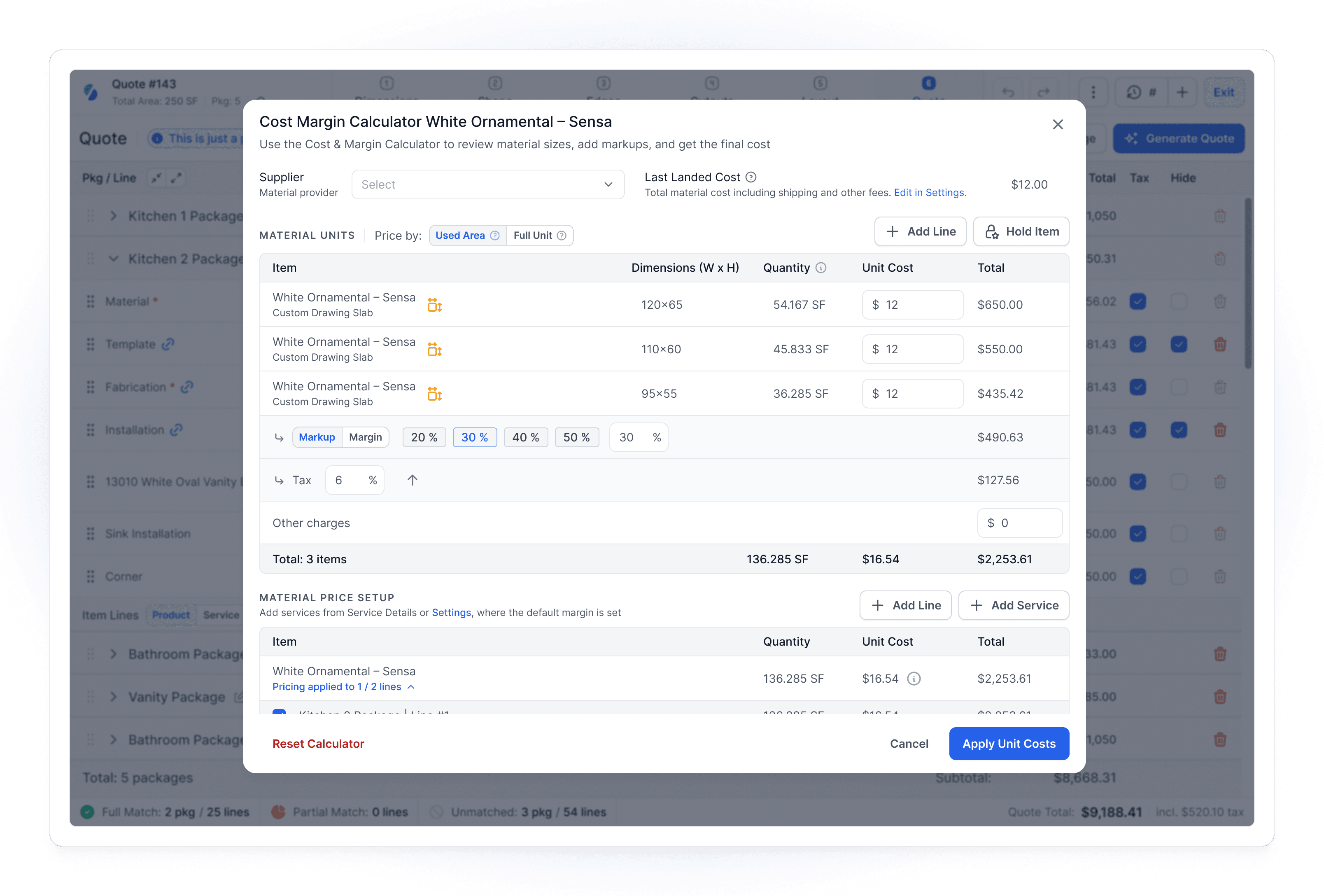
Stonify Cost and Margin Calculator. Ask the estimator to explain the material costs and pricing assumptions behind a quote.
A shop looking only for a drawing tool has a different decision to make. Stonify also offers Drawing Only, while its broader platform covers more of the business. Ask for the appropriate scope, and test specialist machine, templating, and accounting requirements separately wherever they affect your choice.
Compare the Workflows That Matter
Use this table to plan your demonstrations. It summarizes the vendors’ public descriptions checked on November 2, 2026. Confirm the product combination, plan, and setup in your proposal.
Workflow
Stonify
Moraware
Stone Profit Systems
ActionFlow
Quoting
Drawing quantities feed quote lines and material pricing.
CounterGo combines drawings, price lists, and quotes.
Estimates, quote revisions, and fabrication packages.
Quoting module with material choices and revision tracking.
Drawing and Slab Planning
Countertop drawing, slab layouts, and Auto Nest in the same project.
CounterGo drawing and slab layout views.
Measurement calculator and DXF attachments; confirm drawing and layout tools in the demo.
Countertop drawing module for shapes and custom details.
Slabs and Remnants
Slabs, remnants, locations, and allocations connected to quoting.
Inventory tracks slab purchasing, allocations, and remnants.
Slab-level stock, barcodes, allocations, and remnant records.
Slab inventory, barcoding, availability, and job allocation.
Scheduling
Job and crew scheduling with installation routing.
Systemize calendars, job tracking, and digital job packets.
Shop and field calendars for resources, machines, and crews.
Templating, fabrication, and installation scheduling.
Financial Tracking
Invoicing, job costs, and financial reporting connected to inventory.
CounterGo orders and payments export to QuickBooks.
Built-in accounting, general ledger, receivables, payables, and financial statements.
Payment tracking with accounting integrations such as QuickBooks.
For SPS drawing and layout tools, confirm the exact workflow and any connected software during the demo. A request to confirm scope does not mean a feature is unavailable.
Why Start With Stonify?
Start with Stonify if you want drawings, quote lines, slab inventory, job schedules, and financial records in one platform. Then run the same changed job through every shortlisted system and compare the work your team must do.
Ask a Different Follow-Up Question of Each Alternative
Several systems serve stone fabricators, and a feature name alone will not explain how your team would use them. Keep your demonstration pack consistent, then use the questions below to examine each proposed setup. This is Stonify’s buying perspective, based on the vendors’ public product descriptions.
Moraware: Which Product Combination Are We Evaluating?
Moraware’s CounterGo handles drawing and quoting, Systemize handles scheduling and job management, and Inventory covers slab ordering and tracking. The products are designed to connect. Ask for the combination included in the proposal, then run your five changes through it. When comparing with Stonify, include the financial work your team would still need to complete in the proposed arrangement.
Stone Profit Systems: How Will Our Fabrication Team Use the ERP?
Stone Profit Systems covers inventory, purchasing, estimating, scheduling, accounting, and reporting for businesses including fabricators, distributors, and manufacturers. Ask for a demonstration configured around your fabrication work. Compare the tasks your employees complete in SPS and Stonify, along with the configuration and training each vendor includes. Broad coverage is most useful when the people doing the work can use it consistently.
ActionFlow: How Will Operations and Accounting Stay in Agreement?
ActionFlow supports fabrication operations including estimating, scheduling, slab inventory, field communication, and payments. It describes accounting integrations rather than replacing the accounting system. Ask to see a changed transaction, its correction, and the reconciliation process. Compare that arrangement with Stonify’s inventory and finance workflow based on who will own each task in your business.
4. Build a First-Year Cost You Can Explain
Price the setup you have tested. List the people who need access, the work each person must perform, and the products or integrations that make the demonstration possible. Request a written proposal against that list. A starting price gives you little information if the required configuration is still unclear.
Use one calculation for every proposal: 12 months of recurring charges, plus setup, migration, training, required equipment, and any period of overlap with existing subscriptions. Record internal staff time separately. Mark whether each figure is confirmed, estimated, or excluded, and check how adding a user or location changes the total.
Compare that cost with the specific problems you recorded at the start. If a proposed saving depends on a task disappearing, verify how it disappears and whether another person inherits it. Ask for the current offer when making your 2027 budget; this article does not assume today’s prices will remain unchanged.
5. Plan the Changeover Before Agreeing on a Start Date
A practical launch plan names the work, the owner, and the check that must pass. Start with price lists, customer records, material records, and open jobs. Decide which history needs to move and which records can remain accessible in the old system. Have the vendor explain the export options as well as the import process.
Run a sample migration before setting the final changeover date. Check representative slab dimensions and locations, customer details, quote totals, and outstanding balances with the people who know those records. Agree with the bookkeeper on how opening inventory, deposits, and unfinished jobs will be handled.
Choose a limited group of jobs for a supervised trial. Let the estimator prepare the work, the scheduler organize it, and the shop and field teams retrieve their instructions. Record problems and decide which ones must be resolved before more work moves over. Your trial should include an exception from the demonstration, not just a straightforward new job.
Then agree on who provides support during the transition, how urgent issues are escalated, and what the team should do if a required task cannot be completed. Avoid leaving employees to decide which system holds the current record. Give them a clear rule for new jobs and a separate rule for jobs already underway.
Make the Decision With the People Who Will Use It
Before signing, bring the demonstration notes, written scope, first-year cost, and changeover plan into one review. Ask each role to identify what they can complete, what remains uncertain, and what help they will need. Resolve essential gaps with the vendor and include the agreed answers in the implementation scope.
For a shop trying to reduce repeated work between estimating, inventory, production, and finance, we recommend starting that review with Stonify. Bring a job your team knows well and make the demonstration answer your questions. You will have a much firmer basis for a 2027 purchase than a list of features or a promise about what is coming next.
Related Reading
Product information checked against official Stonify, Moraware, Stone Profit Systems, and ActionFlow pages on October 30, 2026. The demonstration scenarios and buying process are editorial recommendations. Confirm current product scope and commercial terms with the vendor.