COMPARISON
Stonify vs ActionFlow
Stonify vs ActionFlow
Both platforms were built for countertop fabricators, but they take different approaches to accounting, automation, scheduling controls, reporting, technology, documents, and implementation.
Updated August 2026


Which Stone Fabrication Platform Is Right for Your Business?
Stonify and ActionFlow are both business-management platforms created specifically for countertop fabrication companies. The strongest comparison is therefore not “fabricator software versus non-fabricator software.” It is how two fabricator-focused platforms solve the same problems differently.
ActionFlow has served countertop fabricators since 2011 and has built a mature platform around quoting, scheduling, inventory, production visibility, payments, electronic signatures, reporting, and workflow management.
Stonify is a newer fabrication ERP built by stone-industry operators to connect the full project lifecycle with native accounting, visual reporting, automatic slab nesting, automatic vein matching, document automation, and operational AI.
This guide compares the areas that matter most to a fabrication company and separates publicly documented facts from product capabilities directly verified by Stonify.
The Quick Verdict
ActionFlow: Established Process and BI Ecosystem
More than a decade of fabrication-industry experience
Power BI through its Performance package
A Windows-based desktop environment, if that is your preference
An established collection of partner integrations
Advanced SignNow functionality
Stonify: A Complete Fabrication ERP
Native accounting inside the same platform
Two-way QuickBooks Online general-ledger synchronization
Browser access from a computer, Mac, tablet, or phone without a Windows desktop install
Automatic slab nesting and automatic vein matching
Operational AI connectors
Built-in visual dashboards and reports, with no separate BI platform required
Document bundling and automated change-order calculations
No added onboarding fee
The key difference: ActionFlow is a capable fabrication-management platform that connects with external accounting and BI tools. Stonify is designed as a full ERP, bringing operations, accounting, reporting, automation, and AI into one connected system.
Stonify vs ActionFlow at a Glance
Category
Stonify
ActionFlow
Built specifically for countertop fabricators
Yes
Yes
CRM and lead management
Yes
Yes
Quoting and estimating
Yes
Yes
Countertop drawing
Yes
Yes
Native automatic slab nesting
Yes
Not publicly documented
Native automatic vein matching
Yes
Not publicly documented
Slab and sink inventory
Yes
Yes
Remnant tracking
Yes
Yes
Barcoding
Yes
Yes
Production scheduling
Yes
Yes
Installation scheduling
Yes
Yes
Advanced resource and calendar controls
Skillsets, capacity, dependencies, restrictions, user-level controls
Scheduling and resource management
Mobile field access
Browser-based field workflow
Mobile application
Primary office access
Web browser
Windows desktop software
Native accounting
Yes
No
QuickBooks Online integration
Yes
Yes
Two-way QuickBooks Online ledger synchronization
Yes
No equivalent two-way ledger sync documented
Operational job profitability reporting
Yes
Yes
Visual reports and dashboards
Built in
Yes
Power BI
No, native dashboards and reports instead
Performance package
Integrated electronic signatures
Native
Yes, through SignNow
Separate electronic-signature usage cost
No
Pay per signature
Document bundling under one signature
Yes
Not publicly documented
Automatic change-order financial calculation
Yes
Not publicly documented
Operational AI connectors
Yes
Not publicly documented
Public pricing
Yes
Yes
Implementation / onboarding fee
No added onboarding fee
$3,000 or $4,500 depending on package
Onsite implementation
Available as an optional paid service
Included by package
Dedicated account support
Yes
Yes
Scroll horizontally to see all columns on smaller screens.
“Not publicly documented” means equivalent functionality was not confirmed in the official ActionFlow materials reviewed. It does not establish that a feature is unavailable. Ask both vendors to demonstrate the current workflow.
Where Each Company Comes From
ActionFlow
ActionFlow has operated since 2011 and describes itself as a business-management platform created specifically for stone fabrication companies.
Its documented capabilities include sales and CRM, quoting, countertop drawing, job tracking, scheduling, slab inventory, barcoding, production visibility, electronic signatures, payment collection, reporting, and QuickBooks integration.
ActionFlow is genuine fabrication-industry software, not a general-purpose platform adapted to stone.
Stonify
Stonify also began from the fabrication side, but it was designed as a complete ERP rather than an operations platform that relies on a separate accounting system.
Lead → Quote → Drawing → Slab Layout → Inventory → Production → Installation → Invoice → Accounting
Information entered during quoting and drawing can continue through material planning, production, installation, invoicing, job costing, and financial reporting without creating separate operational and accounting records.
Detailed Feature Comparison
CRM, Sales, and Lead Management
Both platforms provide CRM and sales-management capabilities.
ActionFlow centralizes customer information and job activity and supports quoting, customer communication, scheduling, payment collection, and job tracking.
Stonify connects leads directly with quotes, project creation, customer records, contacts, tasks, activities, documents, pipeline stages, follow-ups, and sales reporting.
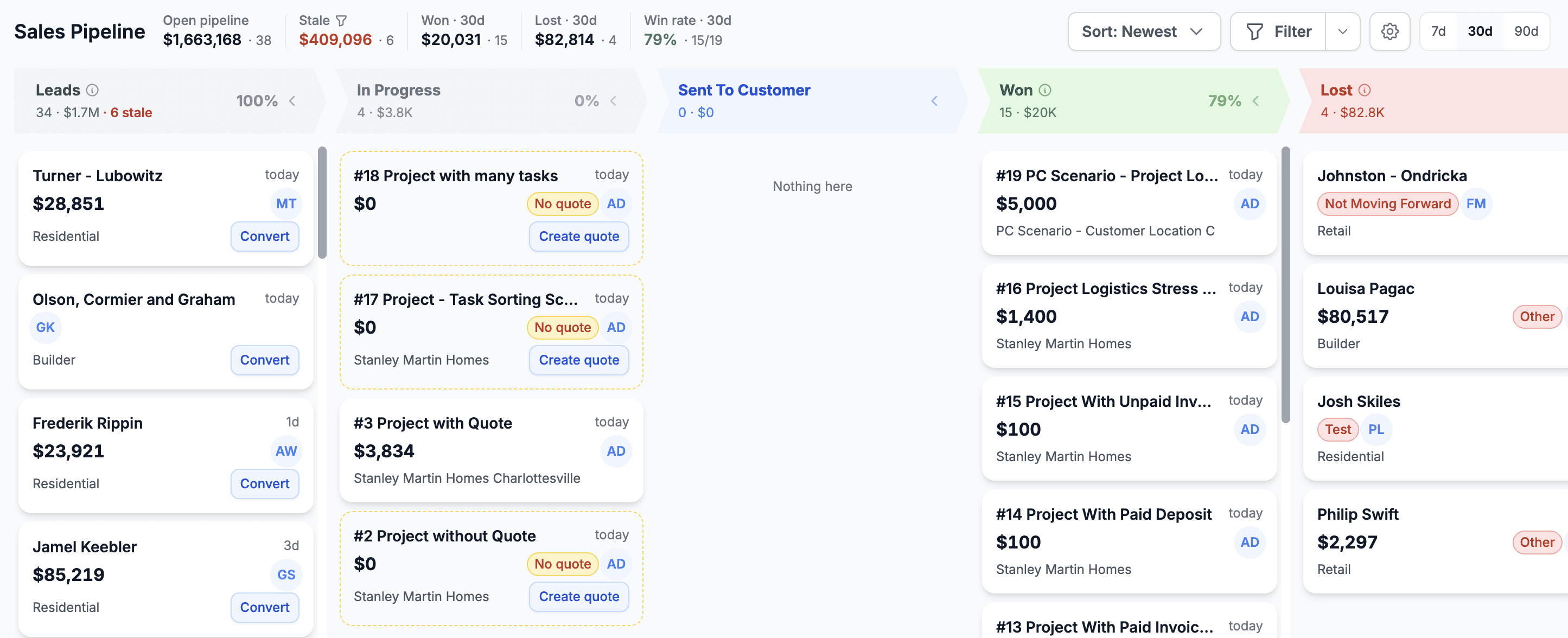
Stonify’s newer Sales Pipeline dashboard gives the sales team a visual board for Leads, In Progress, Sent to Customer, Won, and Lost opportunities. Managers can see open pipeline value, stage conversion, quote age, and salesperson activity in one view, then convert an opportunity into the next stage of the project workflow without recreating the job.
Our Assessment
Both platforms provide legitimate CRM functionality for fabricators. Stonify’s differentiator is the visual sales pipeline combined with the same live project, quoting, task, reporting, and downstream ERP data. Advantage for connected sales-to-ERP workflow: Stonify
Quoting and Estimating
ActionFlow has a developed countertop quoting system with pricing structures, discounts, line items, price lists, margin rules, quote revisions, customer communication, and immediate margin feedback. Its countertop drawing tools support complex shapes including angles, arcs, bump-outs, bump-ins, notches, L-shaped tops, radiuses, cutouts, seams, splashes, sinks, and faucet layouts.
Stonify also supports complex countertop drawing, including bump-outs, bump-ins, notches, custom shapes, cutouts, seams, sinks, edges, and related fabrication geometry. Estimating remains connected with drawing, materials, labor, taxes, discounts, pricing rules, quote packages, slab requirements, and project information.
Drawing quantities can generate or update applicable quote lines, reducing the need to calculate measurements and re-enter them manually.
Our Assessment
Both platforms offer strong fabrication-specific quoting and drawing capabilities. Stonify’s advantage is the continuous connection between drawing quantities, quote pricing, slab planning, automatic nesting, inventory, and downstream ERP records. Advantage for connected drawing-to-ERP workflow: Stonify
Countertop Drawing, Automatic Nesting, and Vein Matching
Both ActionFlow and Stonify include countertop drawing functionality. ActionFlow’s drawing tool supports complex shapes, custom design elements, measurements, cutouts, seams, and quote generation. ActionFlow also integrates with Slabsmith.
Stonify goes further with native automatic slab nesting. Users can create a drawing and use Auto Nest to estimate the required number of slabs, generate those slabs automatically, arrange pieces into a proposed layout, and respect configured slab sizes and margins.
Depending on project complexity, a layout that may take more than 10 minutes to arrange manually can often be generated in seconds using Stonify’s automation.
Stonify also includes a proprietary automatic vein-matching algorithm. Users can control vein direction, piece rotation, and directional restrictions before fabrication.
Native automatic slab nesting and automatic vein matching were not confirmed in the public ActionFlow materials reviewed. Ask ActionFlow to demonstrate these workflows.

Our Assessment
ActionFlow provides legitimate countertop drawing and connects with Slabsmith. Stonify adds native automation directly into the drawing and slab-layout workflow. Winner for native automated slab layout: Stonify
Inventory, Purchasing, and Barcoding
Both platforms provide inventory-management capabilities designed for countertop fabricators.
ActionFlow supports slab and sink inventory, nonserialized inventory, barcoding, material availability, purchasing visibility, and real-time inventory updates. It also integrates with Slabsmith and SPEEDlabel.
Stonify tracks slabs, remnants, bundles, sinks, faucets, consumables, warehouse locations, allocations, costs, purchase orders, inventory transformations, and physical audits.
Stonify also connects with Slabsmith, SPEEDlabel, and Horus Scanner. Inventory movements remain connected with quotes, drawings, projects, production, native accounting, and job costs.
Our Assessment
Both platforms offer meaningful inventory capabilities. Stonify’s advantage is keeping inventory movement connected to native finance and project profitability inside the same ERP. Conclusion: Both deserve a live inventory demonstration; Stonify has the advantage when operations and accounting need to stay in one system.
Scheduling and Production Management
Both systems support the core scheduling needs of a fabrication company, including templating, fabrication, installation, field assignments, and production resources.
Stonify goes further with advanced scheduling controls built around how fabrication shops assign work. The platform can account for resource skillsets, production capacity, workflow dependencies, task restrictions, calendar controls, tracking metrics, and permissions that restrict calendar actions based on user level.
Stonify also includes fabrication-order locking to help prevent sales or administrative changes from affecting a job after production has been scheduled or released.
Our Assessment
ActionFlow has established fabrication scheduling. Stonify provides more granular control over resource skillsets, capacity, dependencies, permissions, calendar restrictions, and production-release protection. Winner for advanced fabrication scheduling controls: Stonify
Platform Access and Technology
The platforms take different approaches to office access.
ActionFlow stores data in Microsoft Azure, but its primary office software is a Windows desktop application.
Stonify is browser-based. Authorized users can log in from a Windows computer, Mac, tablet, or phone through a supported web browser without installing a Windows desktop client. This can simplify deployment across the office, warehouse, shop floor, and field.
Our Assessment
A Windows desktop application may suit organizations standardized around Windows. Stonify provides greater device flexibility for mixed-device teams and locations. Winner for cross-platform browser access: Stonify
Documents and Electronic Signatures
Both systems offer integrated electronic signatures.
ActionFlow partners with SignNow for signature requests, templates, reminders, permissions, recipient management, and signature tracking. Its Process and Performance pricing lists electronic signatures as pay per signature.
Stonify includes document templates, quotes, contracts, change orders, electronic signatures, attachments, project-based file management, and document bundling without a separately listed per-signature charge.
Stonify can generate several related documents at once and combine them into one package. When multiple documents require approval, the customer can sign the bundled package once instead of signing each document separately. Signed documents are then stored directly with the project.

Our Assessment
ActionFlow has a capable SignNow integration. Stonify’s advantage is native document bundling, one-signature approval, project-based document storage, and no separate electronic-signature usage charge. Winner for integrated fabrication document workflow: Stonify
Quote Revisions and Change Orders
ActionFlow supports quote revisions and revision comparison. Public documentation does not clearly confirm the same automated financial change-order calculation used by Stonify.
Stonify compares the original order with the revised order, identifies what was added, removed, or modified, and automatically calculates the financial difference.
This helps the office and customer see what changed, which lines were affected, the value of each change, the revised project total, and the remaining balance.
Our Assessment
Both platforms support revisions. Stonify adds automatic financial change-order calculations and a clearer customer-facing breakdown. Winner for automated change-order financial calculations: Stonify
Accounting and Finance
This is one of the largest structural differences between ActionFlow and Stonify.
ActionFlow does not replace accounting software. It connects operational information with QuickBooks Online.
Stonify includes native accounting with General Ledger, Chart of Accounts, journal entries, accounts receivable, accounts payable, invoicing, payments, Profit and Loss, Balance Sheet, Trial Balance, cash flow, sales-tax tracking, expense management, job costing, and profit-center reporting.
A fabrication company can therefore use Stonify as its primary accounting system without requiring QuickBooks for its financial statements to exist.
Two-Way QuickBooks Online Ledger Synchronization
Companies that prefer QuickBooks Online can still connect it with Stonify. Journal entries can be pushed from Stonify to QuickBooks Online or pulled from QuickBooks Online into Stonify. Accounts are mapped between each company’s preferred Chart of Accounts, and synchronization can be previewed and tracked to prevent duplicates.
Our Assessment
ActionFlow connects the operational system with external accounting software. Stonify gives the customer two choices: run accounting natively inside Stonify, or maintain QuickBooks Online while synchronizing general-ledger entries in both directions. Winner for accounting flexibility and native finance: Stonify
Reporting and Business Intelligence
Both platforms provide reporting and dashboards.
ActionFlow’s higher-tier Performance package includes Power BI, advanced metrics, downloadable data, and multi-facility reporting.
Stonify includes visual dashboards and reports directly inside the ERP for sales, pipeline value, quote conversion, production, material utilization, revenue, expenses, job profitability, discounts, inventory, cash flow, and financial statements.
Stonify does not require Power BI to provide this visibility. The dashboards and reports use the same live operational and financial data already inside the ERP.

Our Assessment
ActionFlow is the better fit if a company specifically wants Power BI. Stonify is the better fit for shops that want reporting and visual dashboards built directly into the ERP without a separate BI layer. Best for Power BI: ActionFlow Performance | Best for built-in ERP reporting: Stonify
AI and Automation
ActionFlow lists AI Search & Chat among its support resources. Equivalent operational AI connectors were not confirmed in the public materials reviewed.
Stonify provides controlled MCP-based AI connectors for approved AI clients such as Claude, Codex, and other compatible tools. The business controls which tools and workflows the AI can access.
Documented and developing workflows include reading purchase orders, looking up customers and products, creating draft quotes and projects, building reports, answering sales and job-status questions, and creating authorized records.
Our Assessment
ActionFlow’s AI functionality is support-oriented. Stonify’s AI connectors are operational and can interact with authorized business workflows and records. Winner for operational AI connectors: Stonify
Integrations
ActionFlow has an established partner ecosystem, including QuickBooks Online, Slabsmith, SignNow, SPEEDlabel, Basys, and Pinpoint Status.
Stonify’s integration ecosystem includes QuickBooks Online, Slabsmith, SPEEDlabel, Nuvei, Avalara, Horus Scanner, Claude, and Codex.
Our Assessment
Both products connect with important stone-industry tools. The better ecosystem depends on the customer’s existing technology stack. Stonify’s differentiators are native finance, two-way QuickBooks Online ledger synchronization, tax automation, scanner connectivity, and operational AI.
Implementation and Support
ActionFlow’s Process and Performance packages include dedicated account support and onsite implementation days, with published implementation fees of $3,000 for Process and $4,500 for Performance.
Stonify provides a dedicated account manager and guided onboarding without an added onboarding fee. Onsite implementation and consulting can also be arranged as an optional paid service when a company wants in-person support.
Our Assessment
Both companies can provide hands-on implementation support. The financial difference is that ActionFlow includes a required implementation fee in its full packages, while Stonify’s standard onboarding has no added fee. Winner for avoiding mandatory implementation fees: Stonify
Pricing Comparison
For a full shop-management comparison, the relevant ActionFlow packages are Process and Performance.
ActionFlow Process
$299
Per Month · First User Included
Additional Full User
$74
Limited User
$49
Implementation
$3,000
Includes inventory, forms, QuickBooks integration, dedicated account management, and two onsite days.
ActionFlow Performance
$499
Per Month · First User Included
Additional Full User
$99
Limited User
$49
Implementation and Consulting
$4,500
Adds Power BI, advanced metrics, multi-facility functionality, downloadable data, and three onsite days.
Stonify Full ERP
$500
Per Month · Includes a $500 Monthly Seat Credit
Standard User
$50
Drawing User
$75
Lite User
$35
All ERP modules included
$500 monthly seat credit included
No added onboarding fee
Annual billing receives a 10% discount
Month-to-month pricing available
Pricing Summary
Cost
Stonify
ActionFlow Process
ActionFlow Performance
Base monthly price
$500
$299
$499
First user
Covered by seat credit
Included
Included
Additional full user
$50 Standard / $75 Drawing
$74
$99
Limited / field user
$35
$49
$49
Implementation fee
$0 standard onboarding
$3,000
$4,500
Native accounting included
Yes
No
No
Power BI included
No
No
Yes
Built-in ERP dashboards/reports
Yes
Yes
Yes
All ERP modules included
Yes
No, package-based
No, package-based
Scroll horizontally to see all columns on smaller screens.
These packages are not identical, so the lowest monthly price should not be viewed in isolation. A proper comparison should include user mix, accounting software, implementation, signature usage, integrations, reporting requirements, training, and whether native accounting is required.
Where ActionFlow Wins
Longer Operating History
ActionFlow has served fabricators since 2011 and has had more time to build its customer base and industry processes.
Power BI
The Performance package includes Power BI, advanced metrics, multi-facility reporting, and downloadable data.
Advanced SignNow Features
ActionFlow has a developed SignNow integration with templates, reminders, permissions, recipient management, bulk-send options, and signature tracking.
Established Partner Ecosystem
ActionFlow has documented connections with several established fabrication, payment, signature, status, and accounting tools.
Where Stonify Wins
Native Accounting
Stonify includes a complete accounting system inside the ERP instead of requiring separate accounting software.
Two-Way QuickBooks Online Ledger Sync
Stonify can push and pull journal entries while maintaining account mappings and synchronization history.
Automatic Slab Nesting and Vein Matching
Both capabilities are native to Stonify and directly connected to drawing and slab planning.
Advanced Scheduling Controls
Stonify supports resource skillsets, capacity, workflow dependencies, calendar restrictions, user-level permissions, and fabrication-order locking.
Browser-Based Access
Users can log in from Windows, Mac, tablet, or phone through a browser without installing a Windows desktop client.
Operational AI
Controlled AI connectors can interact with authorized business workflows and records.
Document Automation
Stonify bundles documents under one signature and automatically calculates change-order financial differences.
No Added Onboarding Fee
Standard guided onboarding is included without the $3,000 or $4,500 implementation fee listed for ActionFlow’s full packages.
All ERP Modules Included
Stonify’s Full ERP platform includes all ERP modules rather than separating core capabilities across packages.
Overall Scorecard
Category
Advantage
Why
Built specifically for fabricators
Both
Both were designed for stone fabrication companies
Operating history
ActionFlow
Serving fabricators since 2011
CRM and lead management
Stonify
Visual pipeline connected directly to quoting and ERP workflow
Quoting and estimating
Both
Both provide fabrication-specific quoting and drawing
Native automatic slab nesting
Stonify
One-click slab estimation, generation, and layout
Native automatic vein matching
Stonify
Built-in vein algorithm and direction controls
Inventory and barcoding
Both
Both support core fabrication inventory workflows
Slabsmith / SPEEDlabel
Both
Both have relevant stone-industry integrations
Scheduling controls
Stonify
Skillsets, capacity, dependencies, restrictions, permissions, and locking
Cross-platform browser access
Stonify
Browser access across common device types
Native accounting
Stonify
Accounting runs inside the ERP
QuickBooks Online integration
Both
Both connect with QuickBooks Online
Two-way QuickBooks Online ledger sync
Stonify
Documented bidirectional general-ledger synchronization
Electronic signatures
Both
Stonify native; ActionFlow via SignNow
Advanced SignNow functionality
ActionFlow
Established SignNow feature set
Document bundling under one signature
Stonify
Native bundled package workflow
Automatic change-order financial calculation
Stonify
Automatically calculates additions, removals, and pricing differences
Reports and dashboards
Both
Both provide operational reporting
Power BI
ActionFlow Performance
Included in its highest package
Built-in ERP reporting without BI
Stonify
Visual operational and financial reporting is native
Operational AI connectors
Stonify
Controlled AI access to approved workflows
Dedicated account support
Both
Both provide dedicated support
Onsite implementation
Both
ActionFlow includes it by package; Stonify can provide it optionally
No mandatory implementation fee
Stonify
Standard onboarding has no added fee
All ERP modules included
Stonify
Full ERP capabilities are not split across tiers
Scroll horizontally to see all columns on smaller screens.
Which Platform Should You Choose?
Choose ActionFlow If
You want an established fabrication platform with more than a decade of history.
You specifically want Power BI and advanced operational metrics.
Your company prefers a Windows desktop application.
Your team values ActionFlow’s current partner ecosystem.
You want the advanced capabilities available through its SignNow integration.
Choose Stonify If
You want operations and accounting inside one ERP.
You want the option to operate without separate accounting software.
You want two-way QuickBooks Online general-ledger synchronization.
You want browser access from Windows, Mac, tablet, and mobile devices.
You want automatic slab nesting and automatic vein matching.
You want advanced resource skillset, capacity, and calendar controls.
You want controlled operational AI connectors.
You want built-in visual reporting without a separate BI platform.
You want document bundling and automated change-order calculations.
You want all ERP modules included.
You want standard onboarding without a mandatory implementation fee.
Final Verdict
ActionFlow and Stonify are both legitimate fabrication-industry platforms.
ActionFlow has more than a decade of experience and offers strong capabilities in quoting, drawing, scheduling, inventory, barcoding, payments, electronic signatures, reporting, integrations, and customer support. Power BI in its Performance package and its advanced SignNow integration will be meaningful advantages for some companies.
Stonify takes the concept further into full ERP territory. It manages the operational side of a fabrication shop while also including the accounting system, financial statements, job costing, inventory-linked financial records, two-way QuickBooks Online ledger synchronization, advanced scheduling controls, automatic slab nesting, automatic vein matching, document automation, built-in visual reporting, and operational AI connectors.
For a company specifically invested in ActionFlow’s existing ecosystem, Power BI, or advanced SignNow functionality, ActionFlow may be the better fit.
For a company seeking a browser-based, all-in-one ERP that connects fabrication operations with native accounting, automation, AI, reporting, and transparent implementation costs, Stonify may be the more complete choice.
The strongest evaluation is not a checklist demonstration. Ask both vendors to process the same real project from lead through final financial reporting. Compare how the lead moves through the pipeline, how the drawing affects quote quantities, how slabs are planned, how resources are scheduled, how change orders are calculated, how inventory becomes job cost, how the invoice reaches accounting, and how management sees actual profitability.
That is where the difference between fabrication-management software and a complete fabrication ERP becomes clear.

Questions & Answers
Have more questions? Don’t hesitate to contact us:
info@stonify.io
01
Is ActionFlow built specifically for stone fabricators?
Yes. ActionFlow is a business-management platform created specifically for stone fabrication companies, with quoting, scheduling, slab inventory, production visibility, payments, and related fabrication workflows.
02
Is Stonify built specifically for stone fabricators?
03
Does ActionFlow include native accounting?
04
Does Stonify include native accounting?
05
Does ActionFlow integrate with QuickBooks Online?
06
Does Stonify integrate with QuickBooks Online?
07
Does ActionFlow have automatic slab nesting?
08
Does Stonify have automatic slab nesting?
09
Does ActionFlow have automatic vein matching?
10
Does Stonify have automatic vein matching?
11
Does ActionFlow have electronic signatures?
12
Does Stonify have electronic signatures?
13
Does ActionFlow have reporting and dashboards?
14
Does Stonify require Power BI for visual reporting?
15
Does ActionFlow have operational AI connectors?
16
Does Stonify use operational AI?
17
How much does ActionFlow cost?
18
How much does Stonify cost?
19
Which system is better for a fabrication company?
Research Methodology and Disclosure
This comparison was prepared by Stonify using current public ActionFlow documentation, current ActionFlow 2026 pricing, Stonify product documentation, Stonify release notes, direct Stonify product knowledge, and competitive product review as of August 2026.
Stonify is a competitor of ActionFlow. This comparison is not endorsed by or affiliated with ActionFlow.
This comparison draws on the supplied August 2026 article and official public product materials. Features that could not be confirmed publicly are identified for verification in a demonstration. Software capabilities and pricing can change, so request current written proposals from both vendors.