Release Notes v0.6.9 (Email Verification, Different Logistics Start Locations)
Emails
User login emails must now be verified in order to receive system notifications (such as task assignment emails).
Email verification is also required for users to receive notifications when they are included in the Notify Users/Groups section of a task.
To check whether your email is verified, open your Profile. You can also start the verification process there.
Logistics
It is now possible to set different colors for each installer. The color is still configured on the vendor level, but individual installers can now override it with their own color.
Each installer can also have a different start location. Open the user profile and choose either:
One of your warehouses
A custom location
Or keep the company default configured in Logistics settings
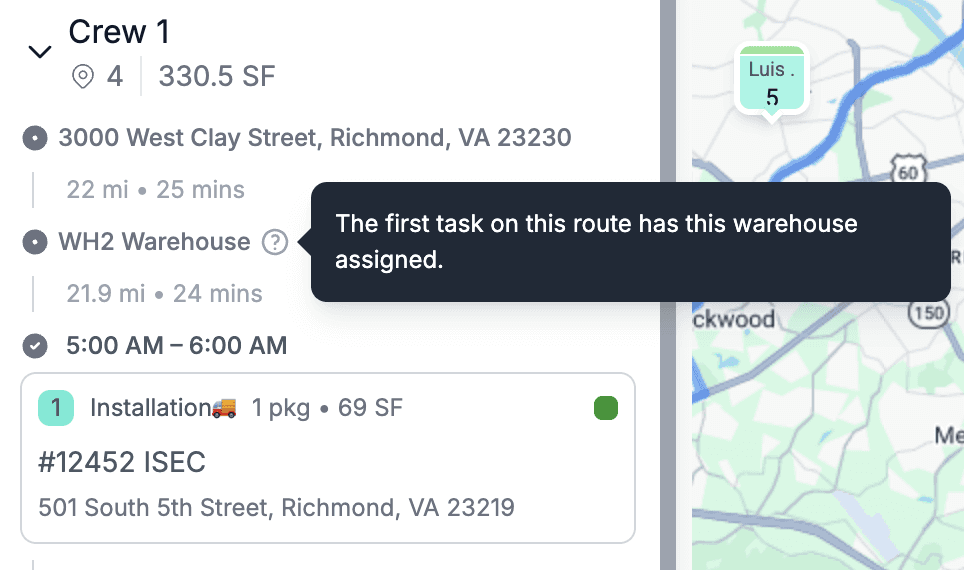
If the first logistics task has a warehouse assigned, the route planner uses that warehouse as the starting point.
This allows workflows where an installer starts at home, goes to the warehouse first, and then proceeds to job sites.
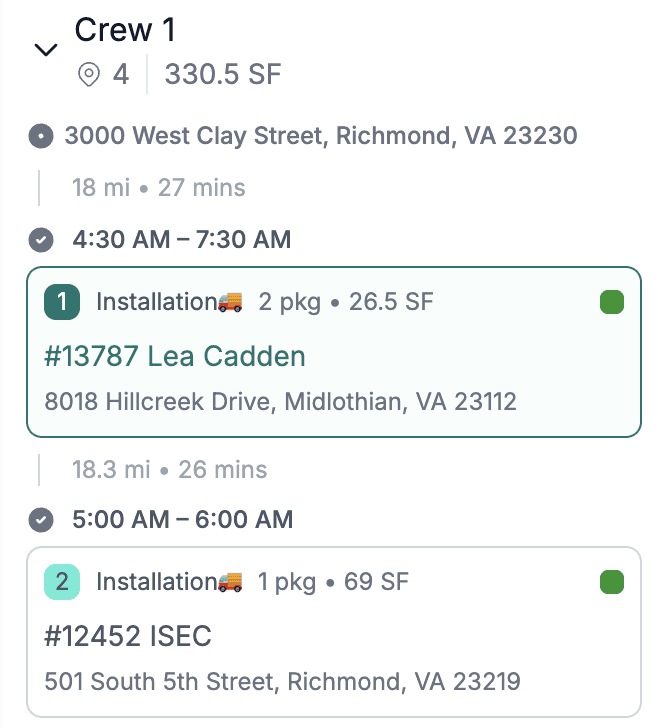
Or they can go directly to job sites if the first task has no warehouse selected.
The images below demonstrate both behaviors:
The first image shows routing starting from the warehouse assigned to the first task
The second image shows direct travel to the job site
User Settings now include a filter to show only users linked to vendors, making it easier to quickly find installers.
Drawing
The slab calculator is now part of the generated line in Drawing, so there is no need to generate the Quote and edit it afterward.
This is the beginning of an upcoming feature that will support pricing by slabs instead of square footage.
Financial Documents
Updated the design of financial documents with a more compact and refreshed UI.
Company Settings
Added an option to configure business hours for the company.
These hours are used by tasks to suggest time options like 8:00 AM, 8:30 AM, etc.
If no business hours are configured, the default range of 6:00 AM – 8:00 PM is used in time dropdowns.