Release notes v0.5.94 (Jan 5)
Jan 5, 2026
Search
The search bar now shows recently accessed projects when you click on it. This makes it faster to return to projects you’ve been working on.
Custom Views
Added a limit (currently 1200 rows) for how many rows can be displayed in a view.
Settings
Added settings for Pricing Tiers.
Quotes
Added an option to create a copy of a Quote.
This is useful for quickly creating alternatives within the same project. You can do this from the Actions menu by selecting Duplicate Quote.
Special Orders
Added the ability to add a note to Special Orders. This note is also shown in Purchase Requests.
This gives you more flexibility when defining special orders.Example use case: You want to offer different products in a quote but don’t want to create them in the catalog yet (to avoid duplicates or unused products). Sales can use a generic “Special Order” product and add the actual product name in the note once the quote is accepted and the item needs to be ordered and created.
Payments
Added a Payee Type filter (Customer, Supplier, Vendor), allowing you to filter payments—for example, to see only supplier payments in a specific period.
Fixed a bug where voided payments appeared in Aged Payables.
Drawing
In Step 6, lines now have a quick way to resolve quantity mismatches between quote lines and the drawing.
This is usually not needed, but it clearly highlights mismatches (e.g., when the drawing was changed after the quote was generated) and provides a one-click fix.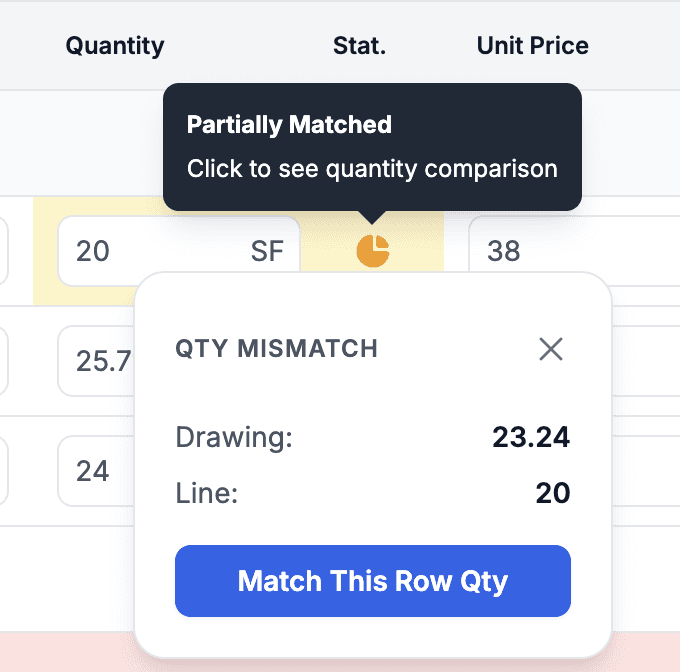
Services can now be created directly from the select component, making it easy to add a service that doesn’t yet exist.
Added keyboard shortcuts:
Delete / Backspace removes a selected shape
Esc unselects the shape
Number keys jump to drawing steps (e.g., 3 goes to Edges)
Added an Area Calculation Mode. See the setting for details—more calculation modes will be added later.