Stonify vs Moraware: Complete 2026 Comparison for Stone Fabricators
Stonify and Moraware serve stone fabrication shops but represent fundamentally different approaches to software. Moraware requires fabricators to purchase and manage three separate modules within their suite—CounterGo for drawing ($100/month per user), Systemize for job management ($120/month per user, 3-user minimum), and Inventory ($50/month per user). A typical 3-user setup costs $810/month (3 users × $270 per user) for these three modules alone, before adding required third-party tools. Stonify provides complete ERP and CRM functionality in one integrated platform starting at $500/month, including unlimited projects, native web-based apps, built-in finance, digital signature capture, dynamic reporting, and built-in drawing tools for up to 10 users.
Quick Decision Framework
Choose Moraware if:
You're comfortable managing multiple separate software modules
You value 20+ years of proven stability
You prefer established platforms with large user communities
Choose Stonify if:
You want everything in one platform (CRM, inventory, finance, web-based apps)
You need modern user interface and advanced ERP + CRM functionality
Your installation crews need real-time access to job information
You're tired of switching between CounterGo and Systemize modules
You need advanced inventory with custom remnant shapes and operations
You want dynamic reporting and sales forecasting built-in
Pricing Comparison: Total Cost of Ownership
Understanding the real monthly cost requires looking at all required tools and labor for manual processes.
Moraware Total Monthly Cost
Scenario: 3-person fabrication shop with drawing, job management, and inventory
Product/Cost | Monthly Cost | Notes |
|---|---|---|
CounterGo | $300 | $100/user × 3 users for drawing and quoting |
Systemize | $360 | $120/user × 3 users (3-user minimum required) |
Inventory | $150 | $50/user × 3 users (part of Systemize platform) |
Moraware Subtotal | $810 | Three separate modules from one vendor |
DocuSign/SignNow | $30-50 | External service for digital signatures |
JobWellDone | $300 | Installer field app (minimum - Field module only) |
QuickBooks | $70-200 | Required for accounting (no built-in finance) |
Manual data entry labor | $200-400 | Time spent re-entering data between modules and QuickBooks |
TOTAL MONTHLY COST | $1,410-1,760 | Multiple disconnected modules + external tools + manual labor |
Additional hidden costs:
Databridge fees for certain third-party integrations
Time lost switching between modules during daily work
Many shops don't sync Systemize to QuickBooks due to incomplete integration, requiring manual accounting entry
Training staff on multiple disconnected systems
Stonify Total Monthly Cost
Same scenario: 3-person fabrication shop with drawing, job management, and inventory
Product | Monthly Cost | Notes |
|---|---|---|
Stonify Base Platform | $500 | Covers your first 10 users (mix any user types) |
3 Drawing users | Included | 3 users × $70 = $210 (covered within $500 base) |
TOTAL MONTHLY COST | $500 | Everything included, one platform, one vendor |
All included at no extra charge:
Unlimited warehouse locations
Web-based app access for field teams
Digital signature capture
Advanced dynamic reporting and analytics
Native integrations (no Databridge required)
Cost Savings: $910-1,260/month ($10,920-15,120 annually)
But the real savings extends beyond subscription fees:
One system to learn instead of three disconnected modules
One vendor relationship to manage
No manual data re-entry between systems
No switching between CounterGo and Systemize during workflows
Faster employee onboarding and training
Elimination of manual QuickBooks data entry
No JobWellDone subscription for field crews
Real Customer Impact: Switching from Multiple Platforms
Discover Surfaces made the switch from Moraware's multi-module ecosystem to Stonify's all-in-one platform. Here's what Victor and Christina DeOliveira experienced:
"Stonify has completely transformed the way we operate at Discover Surfaces. What once required four different platforms is now streamlined into one powerful, intuitive system. From quoting and scheduling to inventory, install tracking, and now accounting—everything we need is right at our fingertips.
It doesn't just organize our workflow; it empowers our entire team with real-time data, clean reporting, and seamless integration across departments. Built with the latest technology and a deep understanding of our industry, it truly reflects the way stone shops work today. For us, it's more than just software — it's a strategic partner that aligns with our vision of delivering excellence with every project. Everyone in this industry must Discover the Stonify Difference."
— Victor DeOliveira, President, and Christina DeOliveira, Vice PresidentDiscover Surfaces
Key transformation metrics from Discover Surfaces:
Consolidated 4 separate platforms into 1 integrated system
Eliminated platform-switching overhead across quoting, scheduling, inventory, and install tracking
Gained real-time data visibility across all departments
Achieved seamless integration from front office to field teams
Quickbooks
Nuvei
Stripe
Avalara
Speedlabel

Slabsmith

Coming in July
D2 Scanner

Coming soon
HubSpot
Coming soon
Pipedrive
Quickbooks
Stripe
Nuvei
Avalara
Speedlabel
Slabsmith
Coming in July
D2 Scanner
Coming soon
HubSpot
Coming soon
Pipedrive
The Core Difference: Integrated Platform vs. Multi-Module Ecosystem
Moraware's Multi-Module Approach
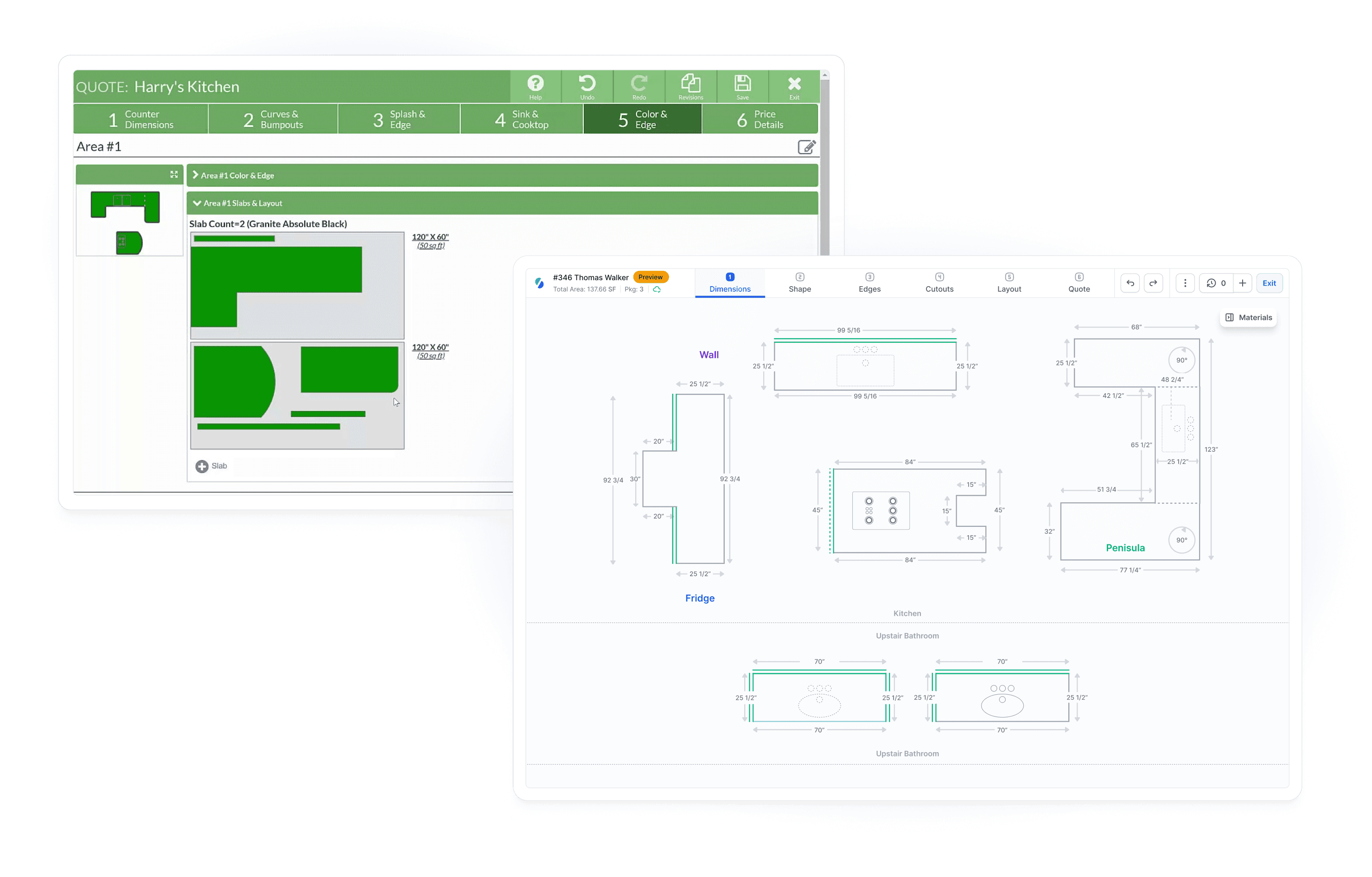
Moraware requires fabricators to purchase three separate modules that work together but require switching between interfaces:
1. CounterGo ($100/month per user)
Countertop drawing and layout
Quote generation
Separate module with its own interface
2. Systemize ($120/month per user for first 3 users, $50/month per additional user)
Job tracking and scheduling
Installation calendar
Inventory management (if Inventory module is purchased)
Separate platform from CounterGo
3-user minimum required ($360/month minimum)
3. Inventory ($50/month per user, requires Systemize)
Slab tracking integrated within Systemize
Purchase orders
Cannot be used without Systemize subscription
Total for 3 users: $810/month for the Moraware module suite
But the ecosystem doesn't stop there. To match Stonify's integrated capabilities, Moraware users typically also need:
4. SignNow or DocuSign (separate subscription, $30-50/month)
Digital signature capture
Moraware creates documents but cannot capture signatures within the system
5. JobWellDone (third-party installer app, $300-$1,000+/month depending on modules)
Field app for installers starting at $300/month (job site documentation, photo capture, mobile sign-offs)
Document generation module: $250/month
Team notifications module: $250/month
Audit tracking module: $250/month
Not built by Moraware - separate vendor and subscription
Most shops need at minimum the Field module ($300/month) for basic installer functionality
6. QuickBooks (required, $70-200/month)
Moraware has no built-in financial management
Must use external accounting software
Many shops perform manual data entry because Systemize-to-QuickBooks sync is incomplete
7. Databridge (for certain integrations)
Third-party middleware for connecting Moraware to some external systems
Additional vendor relationship and cost
Stonify's All-in-One Approach
Stonify provides complete ERP and CRM functionality in a single integrated platform:
One Platform Includes:
Lead management and CRM
Built-in drawing and layout tools ($70/month per user when part of the platform)
Job tracking and project management
Advanced inventory management with custom remnant shapes
Native web-based apps for field teams
Digital document generation AND signature capture
Built-in finance with P&L, balance sheet, tax liability reports, 1099 contractor reports, and more OR QuickBooks integration (your choice)
All integrations built natively (no Databridge middleware needed)
Dynamic reporting and visual analytics
Total cost: $500/month base (includes up to 10 users)
Everything happens in one system—no switching between modules, no manual data re-entry, no juggling multiple vendor relationships.
Feature-by-Feature Comparison
Based on actual platform capabilities as of May 2026:
Feature | Stonify | Moraware |
|---|---|---|
Lead Management | Built-in | Not included |
Advanced Task/Activity Management | Built-in | Not included |
Dynamic Pricing | Built-in | Manual pricing only |
Dynamic Reports | Built-in | Basic reports only |
Advanced Subcontractor Billing | Buld-in | Not included |
Document Automation | Built-in | Documents only, signatures require SignNow/DocuSign |
Advanced Inventory | Built-in | Basic inventory only |
Field App | Native web-based app | Requires third-party JobWellDone ($300+/month) |
Fabrication Order Lock | Built-in | Not included |
Finance | Built-in OR QuickBooks | Requires QuickBooks (no built-in option) |
Job Costing | Built-in | Not included |
Daily Workflow: The Real Operational Difference
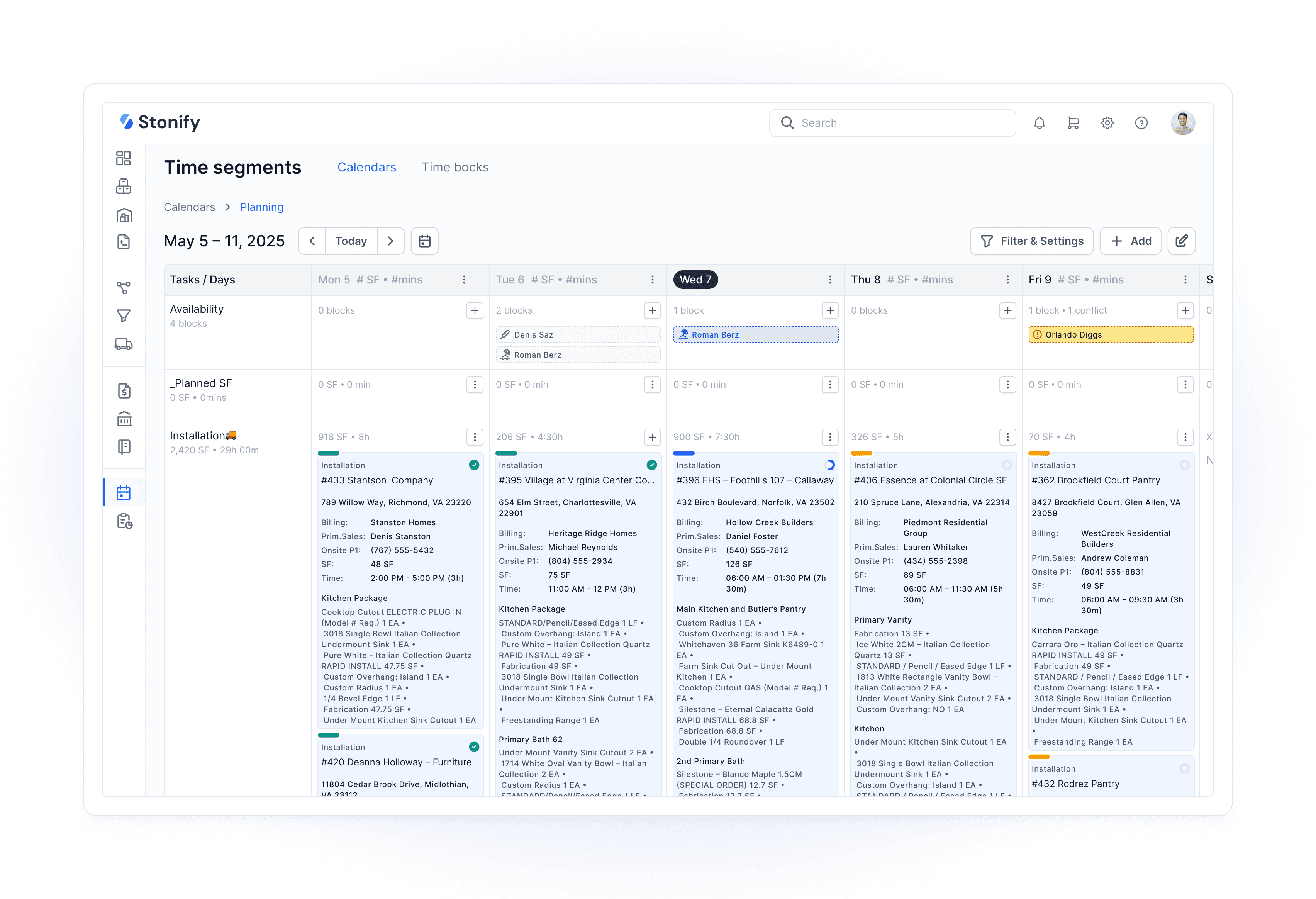
Typical Stonify Single-Platform Workflow
Morning: Sales Team
Open Stonify
Review leads in CRM
Create quote with built-in drawing tool
Check real-time slab availability (same screen)
Immediately hold product for customer to prevent double-booking
Send quote to customer
Customer signs digitally within Stonify document
Convert quote to job with one click (zero re-entry)
Slabs automatically reserved in inventory
Invoice automatically created
Mid-day: Operations Manager
Open Stonify
View schedule, slab locations, and job statuses on one dashboard
Update job progress
Changes immediately visible to field teams on web-based app
End of day: Owner
Open Stonify
Review integrated business dashboard showing:
Open quotes in pipeline
Closed deals this week
Collected payments
Sales forecasting based on pipeline
Job costing and profitability by project
Product markups and margins
Material costs and waste tracking
All data connected automatically in real-time
Time saved: 1-2 hours weekly compared to multi-system workflows
Ready to see the difference?
Schedule a Stonify demo to experience the all-in-one platform in action.
Inventory Management: Basic vs. Advanced
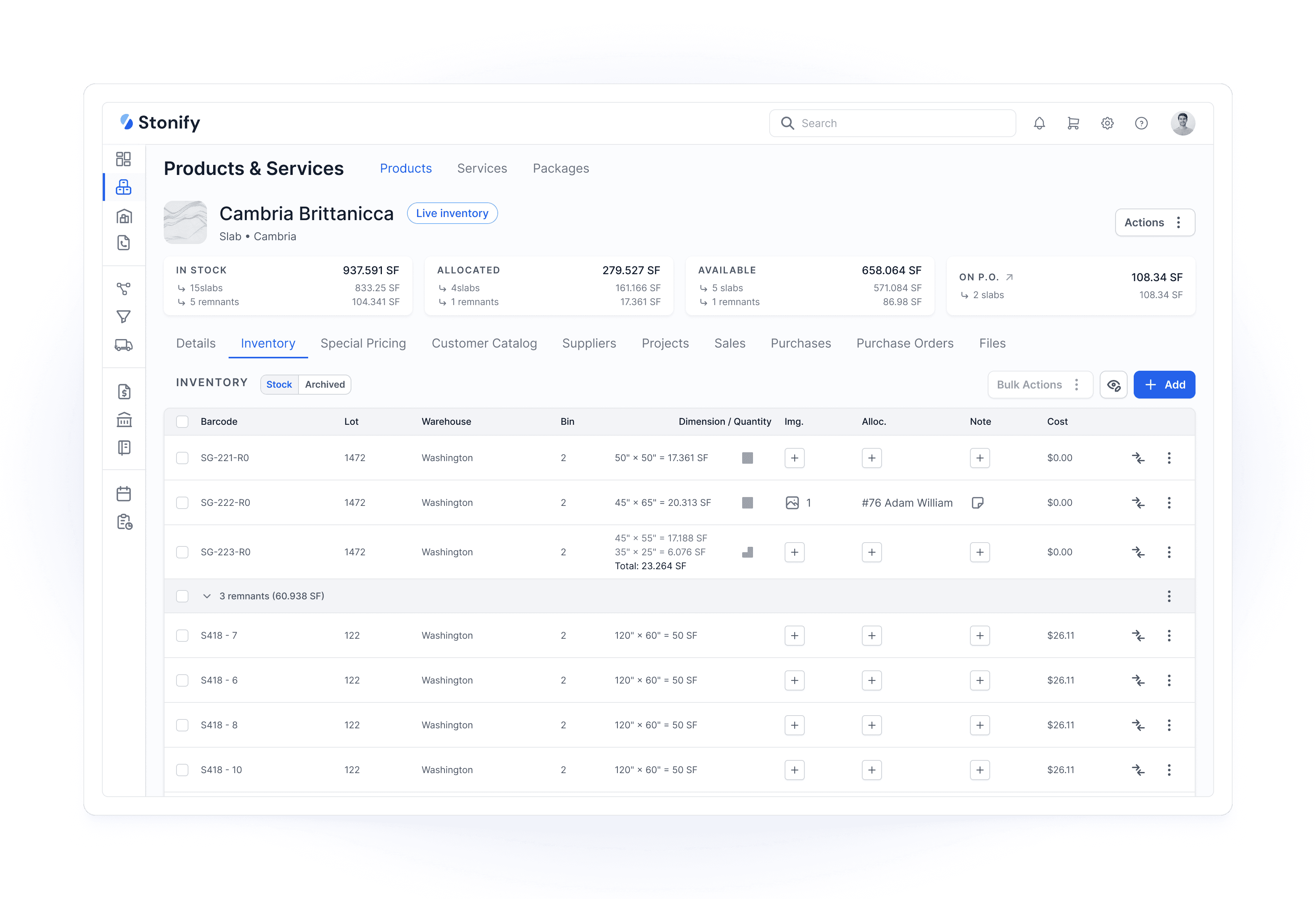
One of the most significant differences between platforms appears in inventory capabilities.
Moraware Inventory Limitations
What Moraware Inventory includes:
Basic slab tracking within Systemize module
Purchase orders
Integration with Systemize jobs
Slab labels
Serialized item tracking
What Moraware Inventory CANNOT do:
Save L-shaped or custom-shaped remnants (remnants tracked as rectangles only)
Inventory operations: write-off, resize, re-evaluate, split
Multiple warehouse locations (different cities, not just different bins)
Consignment inventory management
Inventory audit for consignment tracking
Bulk actions (updating multiple slabs simultaneously)
Shop tools and equipment tracking beyond basic serialization
Real-world impact: When a fabricator cuts a slab and creates an L-shaped remnant, Moraware can only track it as a rectangular piece. This leads to:
8-12% higher material waste due to inability to update correct remnant sizes
Over-purchasing because teams don't have accurate remnant dimensions
Lost profit from remnants that could have been reused but can't be accurately searched
Stonify Advanced Inventory
Everything Moraware has, plus:
L-shaped, custom-shaped, and irregular remnant geometry tracking
Write-off operation (remove damaged slabs from active inventory)
Resize operation (update dimensions after fabrication or discovering cracks)
Re-evaluate operation (adjust value based on damage or market changes)
Multiple warehouse locations in different cities
Consignment inventory (track supplier-owned material separately)
Inventory audit capability for consignment tracking
Bulk actions (update 50 slabs at once)
Shop tools tracking (saws, polishers, equipment)
Barcode scanning and serialization
Photo-based inventory (attach multiple photos per slab)
Real-world impact: A shop with 300 slabs and 150 remnants can:
Search digitally for custom-shaped remnant pieces matching job requirements
Reduce material waste by 8-12% through accurate remnant size tracking($15,000-35,000 annually for a $300K/year material spend)
Track consignment inventory separately from owned inventory
Perform annual inventory audits.
Field Team Experience: Web-Based Access
Moraware Field Access
Moraware provides web-based access to Systemize, allowing field teams to view schedules and job information through mobile browsers. However, most shops use JobWellDone, a third-party installer app that integrates with Moraware.
JobWellDone Capabilities:
View daily schedule and job details
Generate documents for installations
Upload before/after pictures from job sites
Mobile web application interface
Limitations:
Separate platform not built by Moraware
Additional subscription cost starting at $300/month (Field module minimum)
Another vendor relationship to manage
Limited integration depth with Moraware data
Support complexity (is it a Moraware issue or JobWellDone issue?)
Stonify Native Web-Based App
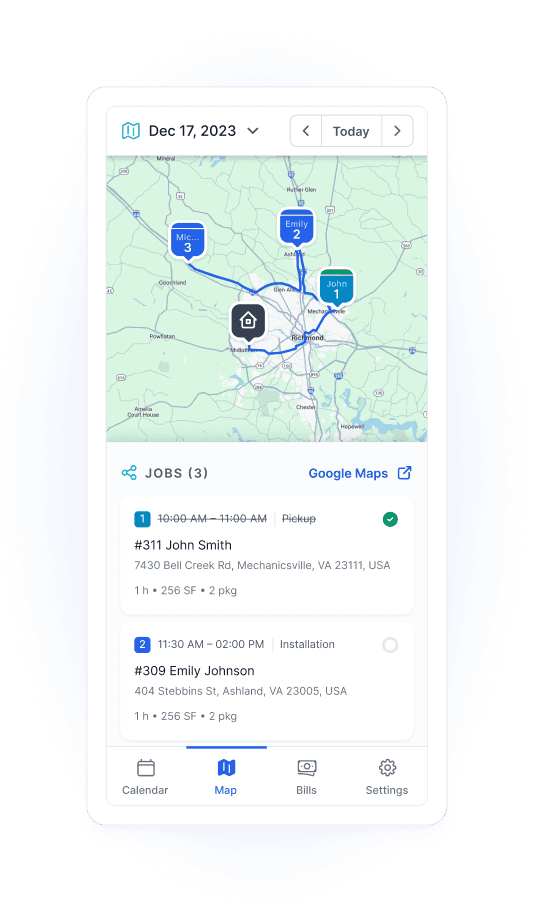
Stonify provides a web-based application designed specifically for stone fabrication field workflows.
Features installers use daily:
Daily schedule with addresses and customer contacts
GPS navigation integration to job sites
Complete job details (materials, measurements, special instructions)
Template file downloads (access drawings on-site)
Photo upload (before/after installation documentation)
Digital signature capture (complete customer sign-offs on-site)
Collect payments from customers (if permission flag is enabled for installers)
View customer open balances
Task completion tracking
Real-time sync (office sees updates within seconds)
Business impact: Shops report 31% fewer customer callbacks because installers have all project information at their fingertips and can document any issues immediately with photos, signatures, and notes.
Financial Management: Why Built-In Finance Matters
Moraware: QuickBooks-Only (Incomplete Integration)
Moraware has no built-in financial management. You must use QuickBooks or similar external accounting software.
The Integration Challenge:
QuickBooks integration with Moraware is never 100% synchronized. Here's what QuickBooks doesn't know about your stone fabrication business:
Missing Labor Intelligence:
QuickBooks doesn't track your actual labor costs per job
Special mitering edge labor costs aren't captured
Fabrication time vs. installation time isn't differentiated
Subcontractor labor tied to specific jobs isn't automatically linked
Missing Material Movement:
QuickBooks only knows your Purchase Orders for products and final invoices
What happens to materials in between? Everything.
When you operate in Stonify with built-in finance, the system tracks every material movement that external accounting tools never see:
Material Lifecycle Tracking:
When you cut a slab, it moves to Work-in-Progress (WIP) account automatically
When you resize a slab due to discovering a crack, inventory value adjusts
When you reclassify a slab (granite labeled as marble, or vice versa), financials update
When you split a slab for multiple jobs, costs allocate correctly
When you create a remnant, you can preserve value in that remnant for future reuse
When materials move between warehouse locations, asset tracking follows
External financial tools like QuickBooks never know your true material and labor costs because they sit outside your operational workflow.
Why This Matters - Operational Efficiency:
Real-time visibility: Stonify automatically tracks costs, payments, and profitability at the job level as work progresses
Asset control: Materials in production are tracked as WIP inventory, not expensed prematurely, ensuring accurate balance sheet reporting
Fewer manual errors: Reduces accounting mistakes and improves reconciliation between jobs and books
Built-in audit trail: Every cost, change order, and payment is logged and traceable to its origin in the job
Better Decision-Making:
Integrated reporting: Financials tied to operations mean more actionable reports (job costing, profit margins, material waste)
Cash flow forecasting: Project timelines and billing schedules help anticipate revenue and expenses more accurately
Moraware Workaround:
Because Systemize-to-QuickBooks sync doesn't capture job-level material movements and labor allocation, many Moraware shops perform manual data entry from Systemize into QuickBooks to maintain accurate job costing. This adds 3-5 hours weekly in administrative overhead.
Stonify: Built-In Finance OR QuickBooks Integration
Stonify offers choice based on your needs:
Option 1: Use Stonify Finance (included in base $500/month)
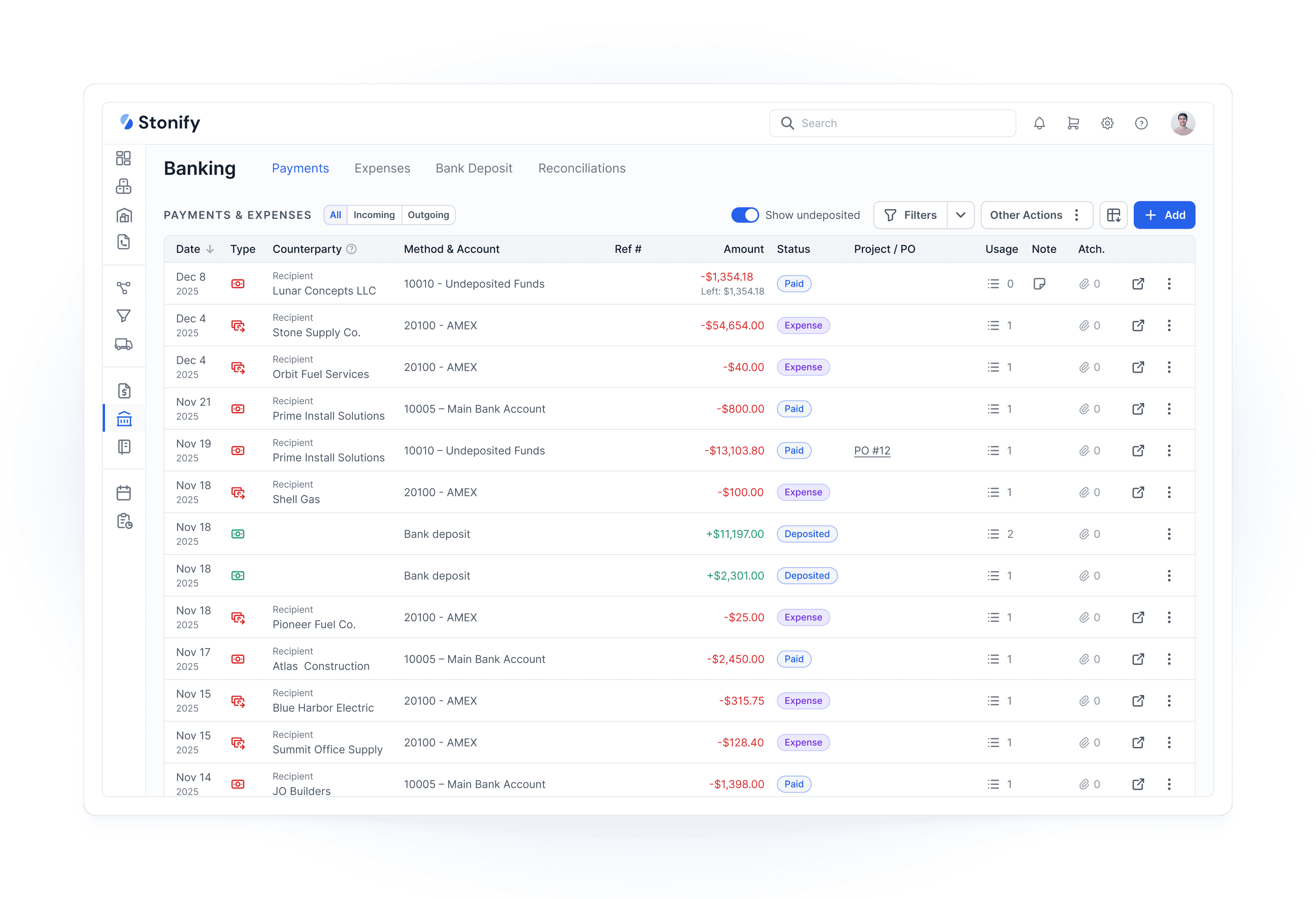
Complete accounting built into the same platform where jobs happen
Chart of accounts, invoicing, payments, reconciliation
P&L reports, balance sheet, tax liability tracking, 1099 contractor reports, and more — all in the same system
Real-time job costing (see profitability the moment a job completes)
Material costs from inventory automatically flow to job costing as slabs are consumed
Labor costs tied to jobs flow directly to financial reports
WIP tracking as jobs move through fabrication
No separate accounting software subscription needed
Option 2: Integrate with QuickBooks ($75/month)
Native integration (no Databridge middleware)
Two-way sync for invoices and payments
Continue using QuickBooks for accounting if your team prefers it
Stonify still handles operational job management and material tracking
The advantage: You choose based on your needs. If you're happy with QuickBooks, keep it. If you want to eliminate one more subscription, consolidate vendors, and gain real-time operational financial visibility, use Stonify Finance.
Real scenario: A fabricator paying $150/month for QuickBooks Advanced can eliminate that subscription entirely by using Stonify Finance, saving $1,800 annually while gaining real-time job profitability visibility tied directly to material usage and labor allocation.
Reporting and Analytics: Static Numbers vs. Dynamic Dashboards
Moraware Reporting
Moraware provides basic reporting showing historical data:
Job completion reports (how many jobs finished this month)
Revenue summaries (total invoiced)
Limitations:
Reports show numbers only (no visual charts or graphs)
Historical data focused (what already happened)
No predictive analytics (what's coming)
No sales team performance tracking
No customer performance tracking
No visual pipeline forecasting
Stonify Dynamic Reporting
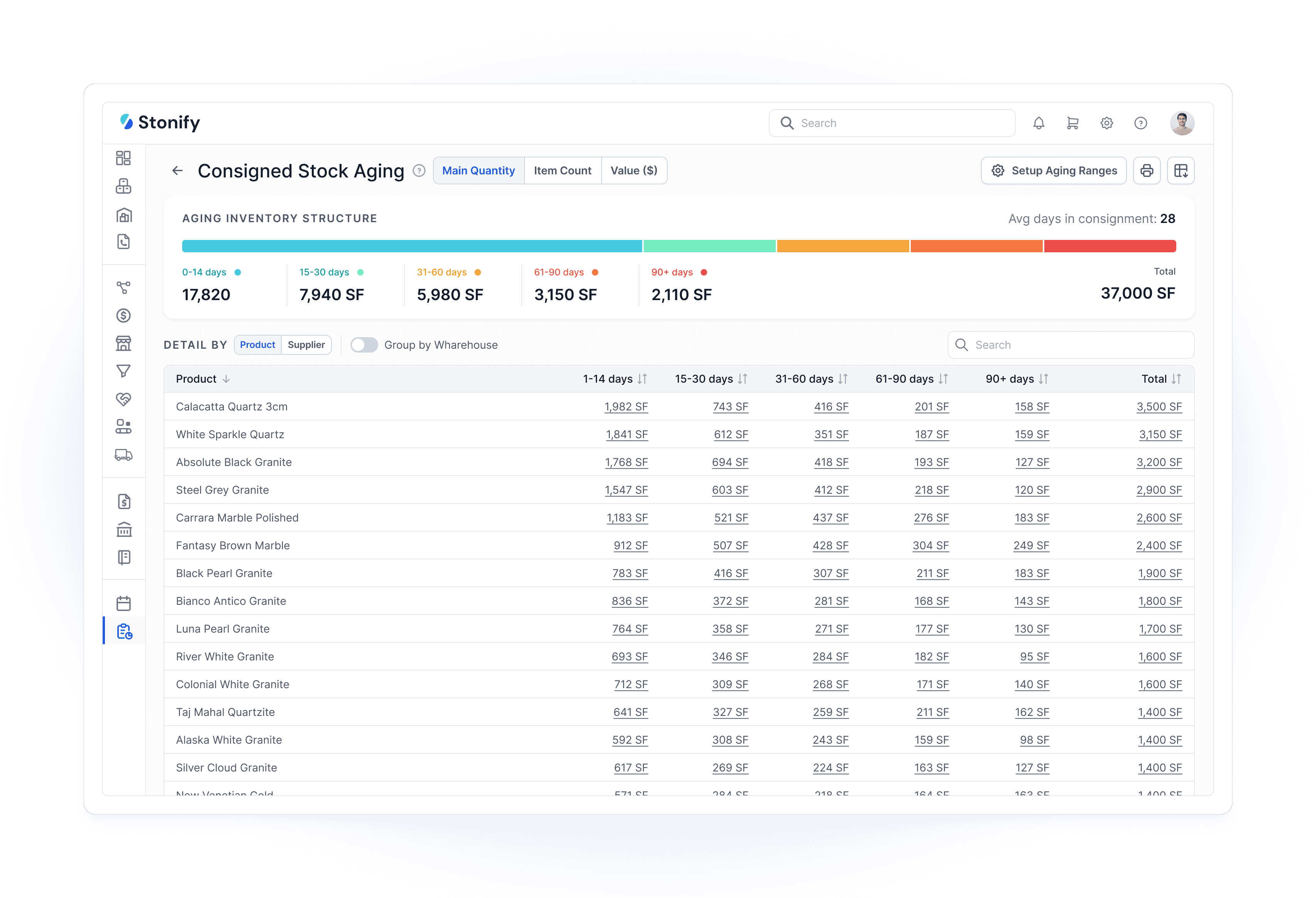
Stonify includes built-in business intelligence dashboards with visual analytics:
Sales Forecasting:
Shows quotes sitting in the pipeline by dollar amount, how long they've been there, and sales person information
Shows estimated deals to be closed and payments to be collected
Custom dashboards can be created for any workflow needs
Invoices pending payment
Visual forecast: "Based on current pipeline, you'll close $180K in May"
Sales Team Performance:
Quote-to-close ratio by salesperson
Average quote time in pipeline
Win rate by project type
Revenue contribution per salesperson
Customer Analytics:
Customer sales history
Repeat customer rate
Average project value by customer segment
Which customer types are most profitable
Inventory Intelligence:
Slow-moving slabs (material sitting 90+ days)
Sales by product reports showing how much of each product is being sold
Number of remnants tracked (remnant reuse rate not yet available)
Material waste trending over time
Visual Presentation:
Dynamic charts and graphs update in real-time
Not just numbers—visual bars, trend lines, heat maps
Drillable (click a bar to see underlying jobs and details)
Integration Ecosystem: Native Connections vs. Databridge Middleware
Moraware Integration Approach
Moraware offers some direct integrations (like QuickBooks) but requires Databridge for many third-party connections.
What is Databridge?
Third-party integration platform (not owned by Moraware)
Acts as middleware connecting Moraware to external systems
Additional subscription cost
Another vendor relationship to manage
When you need Databridge: According to databridgeinc.com, Databridge connects Moraware to:
Certain CRM systems
Some accounting platforms beyond QuickBooks
Specific CNC machine integrations
Various specialized stone industry tools and supplier systems
Challenges:
Additional monthly cost
Support complexity (Moraware can't fix Databridge-related issues)
Sync delays (data moves through intermediary platform)
Integration breaks require coordinating two vendors
Stonify Native Integration Approach
Stonify builds integrations directly into the platform using modern APIs.
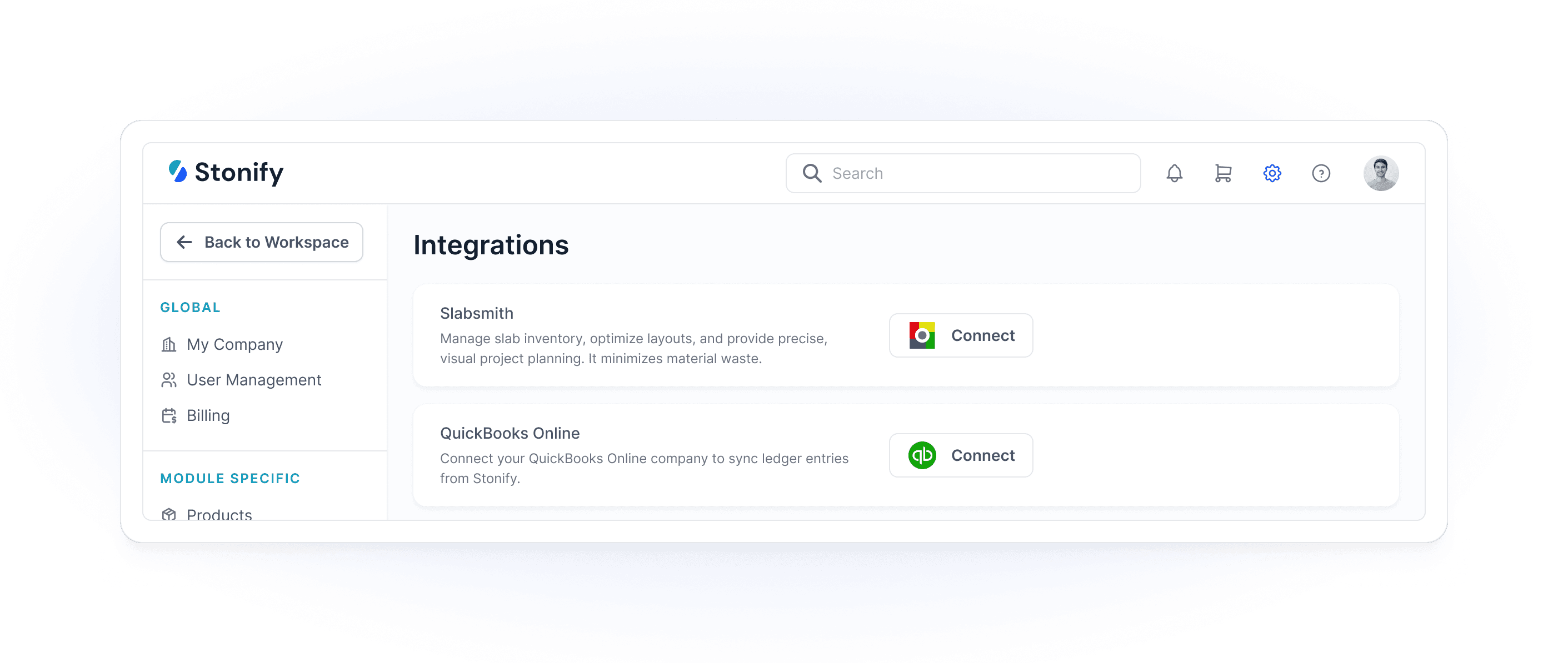
Native integrations include:
QuickBooks (no Databridge or middleware needed)
Stripe (payment processing)
Nuvei (payment processing)
Avalara Tax (automated tax calculation)
SpeedLabel (cut piece tracking system)
Slabsmith (slab photo station)
D2 Scanner (slab photo station)
HubSpot and Pipedrive (CRM integrations - coming soon)
Advantages:
No middleware subscriptions or additional vendors
One vendor (Stonify) responsible for all integrations
Real-time syncing (no intermediary delays)
If integration breaks, Stonify support fixes it directly
API Access:
Stonify provides open REST API for custom integrations
Shops with specialized needs can build direct connections with just a click in the settings (no technical background required)
No Databridge licensing fee for custom development work
Drawing Tools: CounterGo vs. Stonify Comparison
Both platforms provide professional countertop drawing and layout capabilities, each with unique strengths.
CounterGo Strengths (15+ Years of Development)
CounterGo has been refined over 15 years and includes:
Intricate design capabilities for specialized projects
Extensive template library built over years
Strong reputation in industry for drawing precision
Stonify Drawing Strengths (Modern Integrated Approach)
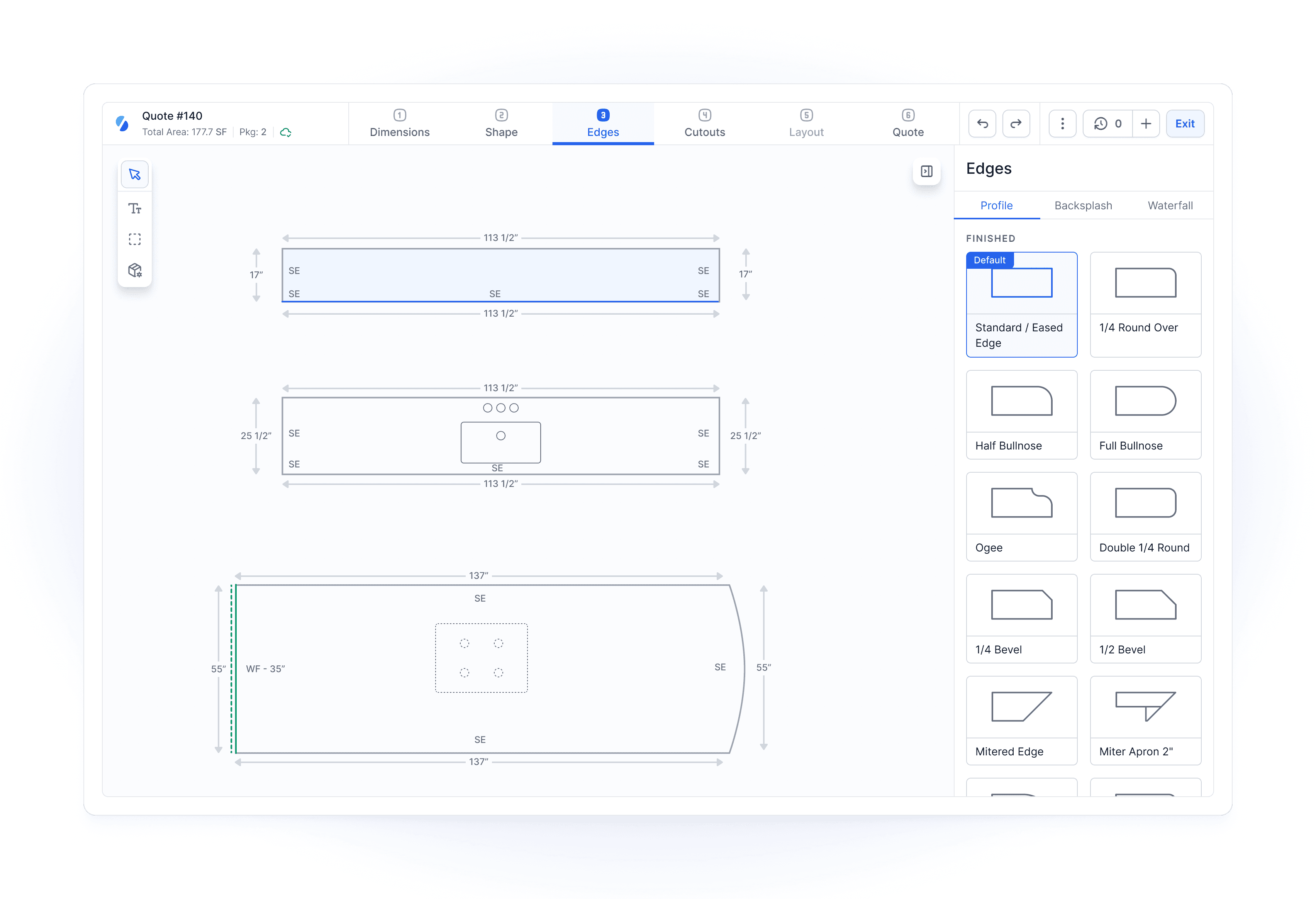
Stonify's drawing tools are newer but include capabilities CounterGo lacks:
Real-Time Inventory Integration:
See your real inventory while drawing for a customer
Hold products for customers directly from drawing interface to prevent double-booking
Real-time slab availability prevents quoting materials you don't have
Financial Visibility During Design:
See product margins and markups before committing to customer pricing
View total material waste on slabs before finalizing layout
See waste per piece to optimize material usage
Make pricing decisions based on actual costs in real-time
Flexible Pricing Options:
Choose how to charge customers for bump-outs: include in pricing, charge separately, or use three other calculation methods
CounterGo defaults to including bump-in and bump-out with no option to change calculation method
Layout Flexibility:
Option to include backsplash and waterfall in separate line items or bundle together
Customizable quoting structure for different customer presentation preferences
Assessment:
Both tools are professional-grade. CounterGo excels at extremely complex edge profiles developed over 15 years. Stonify excels at integrated operational workflow—knowing what inventory you have, what it costs, and what margins you're making while you design.
Choose CounterGo if: You want industry standard.
Choose Stonify if: You want an innovative product with more flexibility in drawing settings, including real-time inventory, pricing visibility, and financial margin analysis during the quoting process.
Migration: Switching from Moraware to Stonify
If you're currently using Moraware and considering Stonify, here's what migration involves:
What Stonify Can Import Directly
Stonify can fully import and migrate the following from Moraware:
Products and Services
All material types, colors, and finish options
Service definitions and pricing structures
Product categories and classifications
All Contacts
All customer info
Suppliers and vendor information
Inventory
Current slab inventory with dimensions and locations
Material costs and valuations
Chart of Accounts and Journal Entries
Migrates your complete financial history for P&L and Balance Sheet reporting
Maintains historical financial data integrity
Preserves accounting audit trail
Pricing Structure
Material pricing matrices
Labor rate structures
Migration Timeline
Week 1-2
Data Import and Setup
Stonify onboarding team helps you export your Moraware data for import
Guide you through configuring workflows, pricing, and user permissions
Set up warehouse locations and operational structure
Week 3-4
Team Training
Office staff training on integrated platform
Sales team training on drawing tools with inventory integration
Field team training on web-based app
This can be parallel while data import continuous
Week 5-6
Parallel Operation
Run both systems simultaneously for validation
Enter new jobs in Stonify, reference historical jobs in Moraware
Verify data accuracy and completeness
Week 7
Full Cutover
Deactivate Moraware subscriptions
Full team working exclusively in Stonify
Moraware maintained as read-only archive (export complete data backup before canceling)
Week 1-2
Data Import and Setup
Stonify onboarding team helps you export your Moraware data for import
Guide you through configuring workflows, pricing, and user permissions
Set up warehouse locations and operational structure
Week 3-4
Team Training
Office staff training on integrated platform
Sales team training on drawing tools with inventory integration
Field team training on web-based app
This can be parallel while data import continuous
Week 5-6
Parallel Operation
Run both systems simultaneously for validation
Enter new jobs in Stonify, reference historical jobs in Moraware
Verify data accuracy and completeness
Week 7
Full Cutover
Deactivate Moraware subscriptions
Full team working exclusively in Stonify
Moraware maintained as read-only archive (export complete data backup before canceling)
Frequently Asked Questions
Have more questions? Don't hesitate to contact us:
info@stonify.io
01
Can I use just one Moraware module (like CounterGo only)?
Yes, Moraware sells modules separately. CounterGo alone ($100/month per user) provides drawing and quoting. However, you'll need separate systems for job management, inventory tracking, and scheduling. Most fabricators find that purchasing all three Moraware modules (CounterGo + Systemize + Inventory at $270/month per user for the first 3 users) plus external tools for signatures, field apps, and accounting costs $1,410-1,760/month for 3 users or $1,460-1,810/month for 10 users.
02
Does Stonify require internet connectivity?
03
Can Stonify handle multiple warehouse locations?
04
What happens to my data if I cancel Stonify?
05
Is Moraware still actively developed?
06
Can Stonify replace my CRM entirely?
07
How long does Stonify implementation take compared to Moraware?
08
What's Stonify's customer support like compared to Moraware?
09
Does the $500/month Stonify base include unlimited users?
Frequently Asked Questions
Have more questions? Don't hesitate to contact us:
info@stonify.io
01
Can I use just one Moraware module (like CounterGo only)?
Yes, Moraware sells modules separately. CounterGo alone ($100/month per user) provides drawing and quoting. However, you'll need separate systems for job management, inventory tracking, and scheduling. Most fabricators find that purchasing all three Moraware modules (CounterGo + Systemize + Inventory at $270/month per user for the first 3 users) plus external tools for signatures, field apps, and accounting costs $1,410-1,760/month for 3 users or $1,460-1,810/month for 10 users.
02
Does Stonify require internet connectivity?
03
Can Stonify handle multiple warehouse locations?
04
What happens to my data if I cancel Stonify?
05
Is Moraware still actively developed?
06
Can Stonify replace my CRM entirely?
07
How long does Stonify implementation take compared to Moraware?
08
What's Stonify's customer support like compared to Moraware?
09
Does the $500/month Stonify base include unlimited users?
Conclusion
Both Stonify and Moraware serve stone fabricators, but they represent different architectural philosophies and cost structures.
Moraware offers proven stability backed by 20+ years in the industry and over 2,000 customers. The three-module suite (CounterGo + Systemize + Inventory) provides solid job management, scheduling, and basic inventory tracking. If you value established platforms and don't mind managing multiple modules plus external tools for signatures, field apps, and accounting, Moraware remains a viable choice. Expect to pay $1,410-1,760/month for a 3-user shop or $1,460-1,810/month for a 10-user shop with complete functionality including necessary external tools (JobWellDone for field crews) and manual data entry labor.
Stonify provides modern, integrated ERP and CRM functionality in one unified platform. If you want to eliminate module switching, need advanced inventory with custom remnant shapes and write-off/resize/re-evaluate operations, require web-based field apps with signature capture and payment collection, and value built-in financial management with real-time job costing tied to material movements, Stonify offers significant operational advantages. Complete ERP and CRM functionality costs $500/month for a 10-user shop.
The tipping point: If you currently pay $1,400-1,800+ monthly across multiple Moraware modules, JobWellDone for field crews, external signature services, accounting software, and manual data entry labor—and your team spends 10+ hours weekly switching between systems and re-entering data—Stonify's all-in-one approach saves $900-1,300/month while providing capabilities Moraware's modular architecture cannot match.
For shops deeply invested in Moraware's ecosystem (8+ years, expert-level users across all modules) and comfortable with the multi-module workflow, migration costs may exceed near-term benefits. For shops seeking modern, integrated, all-in-one software with advanced inventory management, built-in finance, and dynamic reporting, Stonify represents the next generation of stone fabrication management.
About This Comparison
This comparison is based on publicly available information from Moraware's and Stonify's websites (including moraware.com/pricing and jobwelldone.com/pricing), user feedback from stone fabricators, and direct platform feature analysis as of May 2026. Pricing and features may change—verify current offerings with each vendor before making a purchasing decision.
Last Updated: May 13, 2026
Estimate Your Monthly Cost
Pick a plan, add your team, and watch your price update in real time.
Ready to Run a Smarter Stone Operation?
Book a demo to see how Stonify can reduce costs at your shop.
Ready to Run a Smarter Stone Operation?
Book a demo to see how Stonify can reduce costs at your shop.

Stonify vs Moraware: Complete 2026 Comparison for Stone Fabricators
Stonify and Moraware serve stone fabrication shops but represent fundamentally different approaches to software. Moraware requires fabricators to purchase and manage three separate modules within their suite—CounterGo for drawing ($100/month per user), Systemize for job management ($120/month per user, 3-user minimum), and Inventory ($50/month per user). A typical 3-user setup costs $810/month (3 users × $270 per user) for these three modules alone, before adding required third-party tools. Stonify provides complete ERP and CRM functionality in one integrated platform starting at $500/month, including unlimited projects, native web-based apps, built-in finance, digital signature capture, dynamic reporting, and built-in drawing tools for up to 10 users.
Quick Decision Framework
Choose Moraware if:
You're comfortable managing multiple separate software modules
You value 20+ years of proven stability
You prefer established platforms with large user communities
Choose Stonify if:
You want everything in one platform (CRM, inventory, finance, web-based apps)
You need modern user interface and advanced ERP + CRM functionality
Your installation crews need real-time access to job information
You're tired of switching between CounterGo and Systemize modules
You need advanced inventory with custom remnant shapes and operations
You want dynamic reporting and sales forecasting built-in
Pricing Comparison: Total Cost of Ownership
Understanding the real monthly cost requires looking at all required tools and labor for manual processes.
Moraware Total Monthly Cost
Scenario: 3-person fabrication shop with drawing, job management, and inventory
Product/Cost | Monthly Cost | Notes |
|---|---|---|
CounterGo | $300 | $100/user × 3 users for drawing and quoting |
Systemize | $360 | $120/user × 3 users (3-user minimum required) |
Inventory | $150 | $50/user × 3 users (part of Systemize platform) |
Moraware Subtotal | $810 | Three separate modules from one vendor |
DocuSign/SignNow | $30-50 | External service for digital signatures |
JobWellDone | $300 | Installer field app (minimum - Field module only) |
QuickBooks | $70-200 | Required for accounting (no built-in finance) |
Manual data entry labor | $200-400 | Time spent re-entering data between modules and QuickBooks |
TOTAL MONTHLY COST | $1,410-1,760 | Multiple disconnected modules + external tools + manual labor |
Additional hidden costs:
Databridge fees for certain third-party integrations
Time lost switching between modules during daily work
Many shops don't sync Systemize to QuickBooks due to incomplete integration, requiring manual accounting entry
Training staff on multiple disconnected systems
Stonify Total Monthly Cost
Same scenario: 3-person fabrication shop with drawing, job management, and inventory
Product | Monthly Cost | Notes |
|---|---|---|
Stonify Base Platform | $500 | Covers your first 10 users (mix any user types) |
3 Drawing users | Included | 3 users × $70 = $210 (covered within $500 base) |
TOTAL MONTHLY COST | $500 | Everything included, one platform, one vendor |
All included at no extra charge:
Unlimited warehouse locations
Web-based app access for field teams
Digital signature capture
Advanced dynamic reporting and analytics
Native integrations (no Databridge required)
Cost Savings: $910-1,260/month ($10,920-15,120 annually)
But the real savings extends beyond subscription fees:
One system to learn instead of three disconnected modules
One vendor relationship to manage
No manual data re-entry between systems
No switching between CounterGo and Systemize during workflows
Faster employee onboarding and training
Elimination of manual QuickBooks data entry
No JobWellDone subscription for field crews
Real Customer Impact: Switching from Multiple Platforms
Discover Surfaces made the switch from Moraware's multi-module ecosystem to Stonify's all-in-one platform. Here's what Victor and Christina DeOliveira experienced:
"Stonify has completely transformed the way we operate at Discover Surfaces. What once required four different platforms is now streamlined into one powerful, intuitive system. From quoting and scheduling to inventory, install tracking, and now accounting—everything we need is right at our fingertips.
It doesn't just organize our workflow; it empowers our entire team with real-time data, clean reporting, and seamless integration across departments. Built with the latest technology and a deep understanding of our industry, it truly reflects the way stone shops work today. For us, it's more than just software — it's a strategic partner that aligns with our vision of delivering excellence with every project. Everyone in this industry must Discover the Stonify Difference."
— Victor DeOliveira, President, and Christina DeOliveira, Vice PresidentDiscover Surfaces
Key transformation metrics from Discover Surfaces:
Consolidated 4 separate platforms into 1 integrated system
Eliminated platform-switching overhead across quoting, scheduling, inventory, and install tracking
Gained real-time data visibility across all departments
Achieved seamless integration from front office to field teams
Quickbooks
Nuvei
Stripe
Avalara
Speedlabel
Slabsmith
Coming in July
D2 Scanner
Coming soon
HubSpot
Coming soon
Pipedrive
Quickbooks
Stripe
Nuvei
Avalara
Speedlabel
Slabsmith
Coming in July
D2 Scanner
Coming soon
HubSpot
Coming soon
Pipedrive
The Core Difference: Integrated Platform vs. Multi-Module Ecosystem
Moraware's Multi-Module Approach
Moraware requires fabricators to purchase three separate modules that work together but require switching between interfaces:
1. CounterGo ($100/month per user)
Countertop drawing and layout
Quote generation
Separate module with its own interface
2. Systemize ($120/month per user for first 3 users, $50/month per additional user)
Job tracking and scheduling
Installation calendar
Inventory management (if Inventory module is purchased)
Separate platform from CounterGo
3-user minimum required ($360/month minimum)
3. Inventory ($50/month per user, requires Systemize)
Slab tracking integrated within Systemize
Purchase orders
Cannot be used without Systemize subscription
Total for 3 users: $810/month for the Moraware module suite
But the ecosystem doesn't stop there. To match Stonify's integrated capabilities, Moraware users typically also need:
4. SignNow or DocuSign (separate subscription, $30-50/month)
Digital signature capture
Moraware creates documents but cannot capture signatures within the system
5. JobWellDone (third-party installer app, $300-$1,000+/month depending on modules)
Field app for installers starting at $300/month (job site documentation, photo capture, mobile sign-offs)
Document generation module: $250/month
Team notifications module: $250/month
Audit tracking module: $250/month
Not built by Moraware - separate vendor and subscription
Most shops need at minimum the Field module ($300/month) for basic installer functionality
6. QuickBooks (required, $70-200/month)
Moraware has no built-in financial management
Must use external accounting software
Many shops perform manual data entry because Systemize-to-QuickBooks sync is incomplete
7. Databridge (for certain integrations)
Third-party middleware for connecting Moraware to some external systems
Additional vendor relationship and cost
Stonify's All-in-One Approach
Stonify provides complete ERP and CRM functionality in a single integrated platform:
One Platform Includes:
Lead management and CRM
Built-in drawing and layout tools ($70/month per user when part of the platform)
Job tracking and project management
Advanced inventory management with custom remnant shapes
Native web-based apps for field teams
Digital document generation AND signature capture
Built-in finance with P&L, balance sheet, tax liability reports, 1099 contractor reports, and more OR QuickBooks integration (your choice)
All integrations built natively (no Databridge middleware needed)
Dynamic reporting and visual analytics
Total cost: $500/month base (includes up to 10 users)
Everything happens in one system—no switching between modules, no manual data re-entry, no juggling multiple vendor relationships.
Feature-by-Feature Comparison
Based on actual platform capabilities as of May 2026:
Feature | Stonify | Moraware |
|---|---|---|
Lead Management | Built-in | Not included |
Advanced Task/Activity Management | Built-in | Not included |
Dynamic Pricing | Built-in | Manual pricing only |
Dynamic Reports | Built-in | Basic reports only |
Advanced Subcontractor Billing | Buld-in | Not included |
Document Automation | Built-in | Documents only, signatures require SignNow/DocuSign |
Advanced Inventory | Built-in | Basic inventory only |
Field App | Native web-based app | Requires third-party JobWellDone ($300+/month) |
Fabrication Order Lock | Built-in | Not included |
Finance | Built-in OR QuickBooks | Requires QuickBooks (no built-in option) |
Job Costing | Built-in | Not included |
Daily Workflow: The Real Operational Difference
Typical Stonify Single-Platform Workflow
Morning: Sales Team
Open Stonify
Review leads in CRM
Create quote with built-in drawing tool
Check real-time slab availability (same screen)
Immediately hold product for customer to prevent double-booking
Send quote to customer
Customer signs digitally within Stonify document
Convert quote to job with one click (zero re-entry)
Slabs automatically reserved in inventory
Invoice automatically created
Mid-day: Operations Manager
Open Stonify
View schedule, slab locations, and job statuses on one dashboard
Update job progress
Changes immediately visible to field teams on web-based app
End of day: Owner
Open Stonify
Review integrated business dashboard showing:
Open quotes in pipeline
Closed deals this week
Collected payments
Sales forecasting based on pipeline
Job costing and profitability by project
Product markups and margins
Material costs and waste tracking
All data connected automatically in real-time
Time saved: 1-2 hours weekly compared to multi-system workflows
Ready to see the difference?
Schedule a Stonify demo to experience the all-in-one platform in action.
Inventory Management: Basic vs. Advanced
One of the most significant differences between platforms appears in inventory capabilities.
Moraware Inventory Limitations
What Moraware Inventory includes:
Basic slab tracking within Systemize module
Purchase orders
Integration with Systemize jobs
Slab labels
Serialized item tracking
What Moraware Inventory CANNOT do:
Save L-shaped or custom-shaped remnants (remnants tracked as rectangles only)
Inventory operations: write-off, resize, re-evaluate, split
Multiple warehouse locations (different cities, not just different bins)
Consignment inventory management
Inventory audit for consignment tracking
Bulk actions (updating multiple slabs simultaneously)
Shop tools and equipment tracking beyond basic serialization
Real-world impact: When a fabricator cuts a slab and creates an L-shaped remnant, Moraware can only track it as a rectangular piece. This leads to:
8-12% higher material waste due to inability to update correct remnant sizes
Over-purchasing because teams don't have accurate remnant dimensions
Lost profit from remnants that could have been reused but can't be accurately searched
Stonify Advanced Inventory
Everything Moraware has, plus:
L-shaped, custom-shaped, and irregular remnant geometry tracking
Write-off operation (remove damaged slabs from active inventory)
Resize operation (update dimensions after fabrication or discovering cracks)
Re-evaluate operation (adjust value based on damage or market changes)
Multiple warehouse locations in different cities
Consignment inventory (track supplier-owned material separately)
Inventory audit capability for consignment tracking
Bulk actions (update 50 slabs at once)
Shop tools tracking (saws, polishers, equipment)
Barcode scanning and serialization
Photo-based inventory (attach multiple photos per slab)
Real-world impact: A shop with 300 slabs and 150 remnants can:
Search digitally for custom-shaped remnant pieces matching job requirements
Reduce material waste by 8-12% through accurate remnant size tracking($15,000-35,000 annually for a $300K/year material spend)
Track consignment inventory separately from owned inventory
Perform annual inventory audits.
Field Team Experience: Web-Based Access
Moraware Field Access
Moraware provides web-based access to Systemize, allowing field teams to view schedules and job information through mobile browsers. However, most shops use JobWellDone, a third-party installer app that integrates with Moraware.
JobWellDone Capabilities:
View daily schedule and job details
Generate documents for installations
Upload before/after pictures from job sites
Mobile web application interface
Limitations:
Separate platform not built by Moraware
Additional subscription cost starting at $300/month (Field module minimum)
Another vendor relationship to manage
Limited integration depth with Moraware data
Support complexity (is it a Moraware issue or JobWellDone issue?)
Stonify Native Web-Based App
Stonify provides a web-based application designed specifically for stone fabrication field workflows.
Features installers use daily:
Daily schedule with addresses and customer contacts
GPS navigation integration to job sites
Complete job details (materials, measurements, special instructions)
Template file downloads (access drawings on-site)
Photo upload (before/after installation documentation)
Digital signature capture (complete customer sign-offs on-site)
Collect payments from customers (if permission flag is enabled for installers)
View customer open balances
Task completion tracking
Real-time sync (office sees updates within seconds)
Business impact: Shops report 31% fewer customer callbacks because installers have all project information at their fingertips and can document any issues immediately with photos, signatures, and notes.
Financial Management: Why Built-In Finance Matters
Moraware: QuickBooks-Only (Incomplete Integration)
Moraware has no built-in financial management. You must use QuickBooks or similar external accounting software.
The Integration Challenge:
QuickBooks integration with Moraware is never 100% synchronized. Here's what QuickBooks doesn't know about your stone fabrication business:
Missing Labor Intelligence:
QuickBooks doesn't track your actual labor costs per job
Special mitering edge labor costs aren't captured
Fabrication time vs. installation time isn't differentiated
Subcontractor labor tied to specific jobs isn't automatically linked
Missing Material Movement:
QuickBooks only knows your Purchase Orders for products and final invoices
What happens to materials in between? Everything.
When you operate in Stonify with built-in finance, the system tracks every material movement that external accounting tools never see:
Material Lifecycle Tracking:
When you cut a slab, it moves to Work-in-Progress (WIP) account automatically
When you resize a slab due to discovering a crack, inventory value adjusts
When you reclassify a slab (granite labeled as marble, or vice versa), financials update
When you split a slab for multiple jobs, costs allocate correctly
When you create a remnant, you can preserve value in that remnant for future reuse
When materials move between warehouse locations, asset tracking follows
External financial tools like QuickBooks never know your true material and labor costs because they sit outside your operational workflow.
Why This Matters - Operational Efficiency:
Real-time visibility: Stonify automatically tracks costs, payments, and profitability at the job level as work progresses
Asset control: Materials in production are tracked as WIP inventory, not expensed prematurely, ensuring accurate balance sheet reporting
Fewer manual errors: Reduces accounting mistakes and improves reconciliation between jobs and books
Built-in audit trail: Every cost, change order, and payment is logged and traceable to its origin in the job
Better Decision-Making:
Integrated reporting: Financials tied to operations mean more actionable reports (job costing, profit margins, material waste)
Cash flow forecasting: Project timelines and billing schedules help anticipate revenue and expenses more accurately
Moraware Workaround:
Because Systemize-to-QuickBooks sync doesn't capture job-level material movements and labor allocation, many Moraware shops perform manual data entry from Systemize into QuickBooks to maintain accurate job costing. This adds 3-5 hours weekly in administrative overhead.
Stonify: Built-In Finance OR QuickBooks Integration
Stonify offers choice based on your needs:
Option 1: Use Stonify Finance (included in base $500/month)
Complete accounting built into the same platform where jobs happen
Chart of accounts, invoicing, payments, reconciliation
P&L reports, balance sheet, tax liability tracking, 1099 contractor reports, and more — all in the same system
Real-time job costing (see profitability the moment a job completes)
Material costs from inventory automatically flow to job costing as slabs are consumed
Labor costs tied to jobs flow directly to financial reports
WIP tracking as jobs move through fabrication
No separate accounting software subscription needed
Option 2: Integrate with QuickBooks ($75/month)
Native integration (no Databridge middleware)
Two-way sync for invoices and payments
Continue using QuickBooks for accounting if your team prefers it
Stonify still handles operational job management and material tracking
The advantage: You choose based on your needs. If you're happy with QuickBooks, keep it. If you want to eliminate one more subscription, consolidate vendors, and gain real-time operational financial visibility, use Stonify Finance.
Real scenario: A fabricator paying $150/month for QuickBooks Advanced can eliminate that subscription entirely by using Stonify Finance, saving $1,800 annually while gaining real-time job profitability visibility tied directly to material usage and labor allocation.
Reporting and Analytics: Static Numbers vs. Dynamic Dashboards
Moraware Reporting
Moraware provides basic reporting showing historical data:
Job completion reports (how many jobs finished this month)
Revenue summaries (total invoiced)
Limitations:
Reports show numbers only (no visual charts or graphs)
Historical data focused (what already happened)
No predictive analytics (what's coming)
No sales team performance tracking
No customer performance tracking
No visual pipeline forecasting
Stonify Dynamic Reporting
Stonify includes built-in business intelligence dashboards with visual analytics:
Sales Forecasting:
Shows quotes sitting in the pipeline by dollar amount, how long they've been there, and sales person information
Shows estimated deals to be closed and payments to be collected
Custom dashboards can be created for any workflow needs
Invoices pending payment
Visual forecast: "Based on current pipeline, you'll close $180K in May"
Sales Team Performance:
Quote-to-close ratio by salesperson
Average quote time in pipeline
Win rate by project type
Revenue contribution per salesperson
Customer Analytics:
Customer sales history
Repeat customer rate
Average project value by customer segment
Which customer types are most profitable
Inventory Intelligence:
Slow-moving slabs (material sitting 90+ days)
Sales by product reports showing how much of each product is being sold
Number of remnants tracked (remnant reuse rate not yet available)
Material waste trending over time
Visual Presentation:
Dynamic charts and graphs update in real-time
Not just numbers—visual bars, trend lines, heat maps
Drillable (click a bar to see underlying jobs and details)
Integration Ecosystem: Native Connections vs. Databridge Middleware
Moraware Integration Approach
Moraware offers some direct integrations (like QuickBooks) but requires Databridge for many third-party connections.
What is Databridge?
Third-party integration platform (not owned by Moraware)
Acts as middleware connecting Moraware to external systems
Additional subscription cost
Another vendor relationship to manage
When you need Databridge: According to databridgeinc.com, Databridge connects Moraware to:
Certain CRM systems
Some accounting platforms beyond QuickBooks
Specific CNC machine integrations
Various specialized stone industry tools and supplier systems
Challenges:
Additional monthly cost
Support complexity (Moraware can't fix Databridge-related issues)
Sync delays (data moves through intermediary platform)
Integration breaks require coordinating two vendors
Stonify Native Integration Approach
Stonify builds integrations directly into the platform using modern APIs.
Native integrations include:
QuickBooks (no Databridge or middleware needed)
Stripe (payment processing)
Nuvei (payment processing)
Avalara Tax (automated tax calculation)
SpeedLabel (cut piece tracking system)
Slabsmith (slab photo station)
D2 Scanner (slab photo station)
HubSpot and Pipedrive (CRM integrations - coming soon)
Advantages:
No middleware subscriptions or additional vendors
One vendor (Stonify) responsible for all integrations
Real-time syncing (no intermediary delays)
If integration breaks, Stonify support fixes it directly
API Access:
Stonify provides open REST API for custom integrations
Shops with specialized needs can build direct connections with just a click in the settings (no technical background required)
No Databridge licensing fee for custom development work
Drawing Tools: CounterGo vs. Stonify Comparison
Both platforms provide professional countertop drawing and layout capabilities, each with unique strengths.
CounterGo Strengths (15+ Years of Development)
CounterGo has been refined over 15 years and includes:
Intricate design capabilities for specialized projects
Extensive template library built over years
Strong reputation in industry for drawing precision
Stonify Drawing Strengths (Modern Integrated Approach)
Stonify's drawing tools are newer but include capabilities CounterGo lacks:
Real-Time Inventory Integration:
See your real inventory while drawing for a customer
Hold products for customers directly from drawing interface to prevent double-booking
Real-time slab availability prevents quoting materials you don't have
Financial Visibility During Design:
See product margins and markups before committing to customer pricing
View total material waste on slabs before finalizing layout
See waste per piece to optimize material usage
Make pricing decisions based on actual costs in real-time
Flexible Pricing Options:
Choose how to charge customers for bump-outs: include in pricing, charge separately, or use three other calculation methods
CounterGo defaults to including bump-in and bump-out with no option to change calculation method
Layout Flexibility:
Option to include backsplash and waterfall in separate line items or bundle together
Customizable quoting structure for different customer presentation preferences
Assessment:
Both tools are professional-grade. CounterGo excels at extremely complex edge profiles developed over 15 years. Stonify excels at integrated operational workflow—knowing what inventory you have, what it costs, and what margins you're making while you design.
Choose CounterGo if: You want industry standard.
Choose Stonify if: You want an innovative product with more flexibility in drawing settings, including real-time inventory, pricing visibility, and financial margin analysis during the quoting process.
Migration: Switching from Moraware to Stonify
If you're currently using Moraware and considering Stonify, here's what migration involves:
What Stonify Can Import Directly
Stonify can fully import and migrate the following from Moraware:
Products and Services
All material types, colors, and finish options
Service definitions and pricing structures
Product categories and classifications
All Contacts
All customer info
Suppliers and vendor information
Inventory
Current slab inventory with dimensions and locations
Material costs and valuations
Chart of Accounts and Journal Entries
Migrates your complete financial history for P&L and Balance Sheet reporting
Maintains historical financial data integrity
Preserves accounting audit trail
Pricing Structure
Material pricing matrices
Labor rate structures
Migration Timeline
Week 1-2
Data Import and Setup
Stonify onboarding team helps you export your Moraware data for import
Guide you through configuring workflows, pricing, and user permissions
Set up warehouse locations and operational structure
Week 3-4
Team Training
Office staff training on integrated platform
Sales team training on drawing tools with inventory integration
Field team training on web-based app
This can be parallel while data import continuous
Week 5-6
Parallel Operation
Run both systems simultaneously for validation
Enter new jobs in Stonify, reference historical jobs in Moraware
Verify data accuracy and completeness
Week 7
Full Cutover
Deactivate Moraware subscriptions
Full team working exclusively in Stonify
Moraware maintained as read-only archive (export complete data backup before canceling)
Week 1-2
Data Import and Setup
Stonify onboarding team helps you export your Moraware data for import
Guide you through configuring workflows, pricing, and user permissions
Set up warehouse locations and operational structure
Week 3-4
Team Training
Office staff training on integrated platform
Sales team training on drawing tools with inventory integration
Field team training on web-based app
This can be parallel while data import continuous
Week 5-6
Parallel Operation
Run both systems simultaneously for validation
Enter new jobs in Stonify, reference historical jobs in Moraware
Verify data accuracy and completeness
Week 7
Full Cutover
Deactivate Moraware subscriptions
Full team working exclusively in Stonify
Moraware maintained as read-only archive (export complete data backup before canceling)
Frequently Asked Questions
Have more questions? Don't hesitate to contact us:
info@stonify.io
01
Can I use just one Moraware module (like CounterGo only)?
Yes, Moraware sells modules separately. CounterGo alone ($100/month per user) provides drawing and quoting. However, you'll need separate systems for job management, inventory tracking, and scheduling. Most fabricators find that purchasing all three Moraware modules (CounterGo + Systemize + Inventory at $270/month per user for the first 3 users) plus external tools for signatures, field apps, and accounting costs $1,410-1,760/month for 3 users or $1,460-1,810/month for 10 users.
02
Does Stonify require internet connectivity?
03
Can Stonify handle multiple warehouse locations?
04
What happens to my data if I cancel Stonify?
05
Is Moraware still actively developed?
06
Can Stonify replace my CRM entirely?
07
How long does Stonify implementation take compared to Moraware?
08
What's Stonify's customer support like compared to Moraware?
09
Does the $500/month Stonify base include unlimited users?
Frequently Asked Questions
Have more questions? Don't hesitate to contact us:
info@stonify.io
01
Can I use just one Moraware module (like CounterGo only)?
Yes, Moraware sells modules separately. CounterGo alone ($100/month per user) provides drawing and quoting. However, you'll need separate systems for job management, inventory tracking, and scheduling. Most fabricators find that purchasing all three Moraware modules (CounterGo + Systemize + Inventory at $270/month per user for the first 3 users) plus external tools for signatures, field apps, and accounting costs $1,410-1,760/month for 3 users or $1,460-1,810/month for 10 users.
02
Does Stonify require internet connectivity?
03
Can Stonify handle multiple warehouse locations?
04
What happens to my data if I cancel Stonify?
05
Is Moraware still actively developed?
06
Can Stonify replace my CRM entirely?
07
How long does Stonify implementation take compared to Moraware?
08
What's Stonify's customer support like compared to Moraware?
09
Does the $500/month Stonify base include unlimited users?
Conclusion
Both Stonify and Moraware serve stone fabricators, but they represent different architectural philosophies and cost structures.
Moraware offers proven stability backed by 20+ years in the industry and over 2,000 customers. The three-module suite (CounterGo + Systemize + Inventory) provides solid job management, scheduling, and basic inventory tracking. If you value established platforms and don't mind managing multiple modules plus external tools for signatures, field apps, and accounting, Moraware remains a viable choice. Expect to pay $1,410-1,760/month for a 3-user shop or $1,460-1,810/month for a 10-user shop with complete functionality including necessary external tools (JobWellDone for field crews) and manual data entry labor.
Stonify provides modern, integrated ERP and CRM functionality in one unified platform. If you want to eliminate module switching, need advanced inventory with custom remnant shapes and write-off/resize/re-evaluate operations, require web-based field apps with signature capture and payment collection, and value built-in financial management with real-time job costing tied to material movements, Stonify offers significant operational advantages. Complete ERP and CRM functionality costs $500/month for a 10-user shop.
The tipping point: If you currently pay $1,400-1,800+ monthly across multiple Moraware modules, JobWellDone for field crews, external signature services, accounting software, and manual data entry labor—and your team spends 10+ hours weekly switching between systems and re-entering data—Stonify's all-in-one approach saves $900-1,300/month while providing capabilities Moraware's modular architecture cannot match.
For shops deeply invested in Moraware's ecosystem (8+ years, expert-level users across all modules) and comfortable with the multi-module workflow, migration costs may exceed near-term benefits. For shops seeking modern, integrated, all-in-one software with advanced inventory management, built-in finance, and dynamic reporting, Stonify represents the next generation of stone fabrication management.
About This Comparison
This comparison is based on publicly available information from Moraware's and Stonify's websites (including moraware.com/pricing and jobwelldone.com/pricing), user feedback from stone fabricators, and direct platform feature analysis as of May 2026. Pricing and features may change—verify current offerings with each vendor before making a purchasing decision.
Last Updated: May 13, 2026
Estimate Your Monthly Cost
Pick a plan, add your team, and watch your price update in real time.
Ready to Run a Smarter Stone Operation?
Book a demo to see how Stonify can reduce costs at your shop.